
AI-Assisted Websites for Small Business: Help Customers Find the Right Next Step
A practical guide to using AI on a small-business website to understand customer questions, reduce unnecessary choices and suggest useful next steps while people keep control of important decisions.
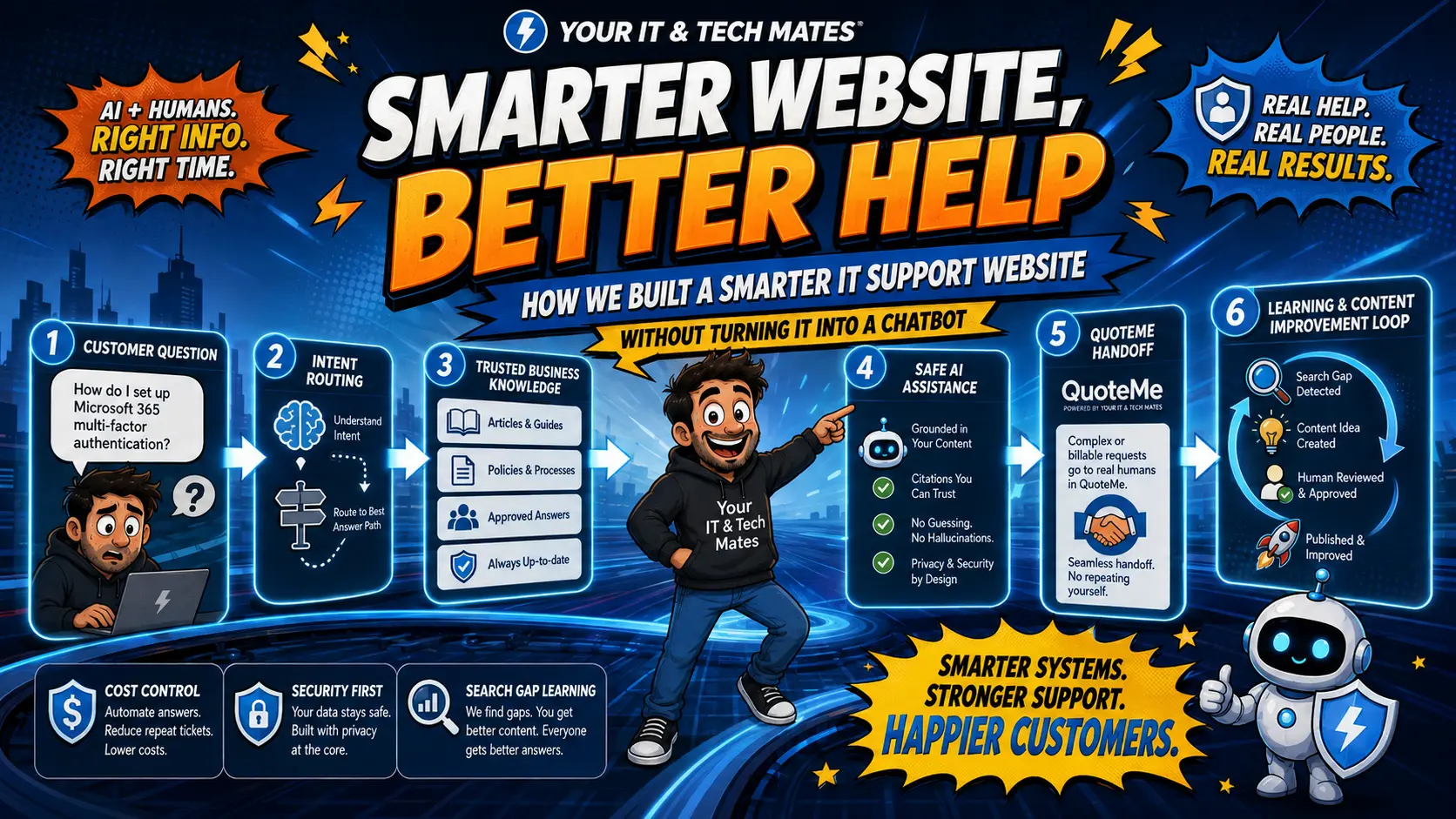
New: QuoteMe journey — useful help before the enquiry
These guides explain how we turn a customer problem into useful guidance first, then carry confirmed context into a reviewed QuoteMe request without making the customer start again.
Virtual admin: enquiries, handovers and follow-through
Four practical guides to the office workflow we have built: prepare useful context, review the next action and keep responsibility clear.
New: Intent-Aware Website business series
Ten practical guides based on the way we have been building our own Intent Engine: how content meaning, browsing context, customer corrections, privacy boundaries and lead readiness can work together to create clearer customer journeys.
New: Guided Tech Support 2.0, smarter help with fewer questions
These 15 guides explain our newest Guided Tools approach: start with the problem in your own words, ask only useful clarifications, confirm what the system understands, carry context forward and keep privacy, safety and human control at the centre of the journey.
New: Adaptive Intent & Verified Evidence series
Follow the next stage of our intent-driven website build: choose the next useful question, know when to stop, carry context into QuoteMe, measure whether questions help, calibrate by journey context, and bring current external evidence into the experience without letting AI become the source of truth.
New: six-part Intent Engine education series
Follow the complete governed journey, from uncertainty and safety through approved business data, customer corrections, effort measurement and AI-agent readiness. Every article uses the same friendly guide and keeps consequential decisions under customer or human control.
New: AI website outcomes, learning and optimisation
These new business guides explain how a smarter website can learn from customer journeys, measure lead quality, improve recommendations and test changes safely without relying on invasive tracking or automatic self-retraining.
New: measurable, safer AI website journeys
These four practical guides explain how we reduce unnecessary questions, learn from privacy-minimised journey signals, test changes before customers see them and measure helpful outcomes beyond conversions.
New: intent-driven features in practice
Our latest guides explain how the website now handles business-pain language, asks fewer context-aware questions, measures lead readiness without invasive tracking, and checks local service areas without Google Maps.
Quick answer
An AI-assisted website can help a customer explain what they need in ordinary words, narrow the choices and show a useful next step. The safest design keeps approved pages, prices, requests and important decisions under business and human control rather than letting AI invent actions on its own.
Choose the question you want to answer next
Intent Intelligence: real build examples and business lessons
These guides use our own live customer-intent work as the example, then explain what another small business can take from the pattern. Each article links back to the existing Small Business Software & AI Solutions Melbourne hub rather than creating a separate commercial pathway.
New in this hub: Intent Engine examples for organisations
These five plain-English guides show how the same Intent Engine approach can help schools, childcare services, retirement villages and wider organisations start with the real problem instead of a confusing service menu. Start with the pillar guide, then explore each organisation example.
Why normal websites can make customers work too hard
Many service websites start by asking the customer to choose the right menu, service name or form. That works when the visitor already knows exactly what they need. It is harder when they only know what happened: “my laptop keeps flickering”, “our Wi-Fi drops out”, “someone sent me a suspicious invoice”, or “we copy every website enquiry into a spreadsheet”.
A smarter customer journey starts with the problem the customer can describe, then helps them move toward the right existing service, guide, price information or request path.
What an AI-assisted website can do
- Understand everyday wording. A customer can describe the problem without knowing your internal service names.
- Reduce unnecessary choices. Once the likely need is clear, the page can bring the most useful actions forward and quieten unrelated options.
- Keep useful context. The customer should not have to repeat the same basic problem on every page.
- Use photos when they genuinely help. A photo can add visible context, while a person still confirms diagnosis, scope and paid work.
- Show a small number of next steps. The website can select approved actions such as “see pricing”, “start a request” or “check this first”.
- Keep people in control. Important advice, final scope, fixed pricing and paid work can stay behind explicit human or customer confirmation.
A simple customer example
A visitor writes: “My laptop screen flickers after I dropped it.”
A useful website does not need to turn that into a long AI conversation. It can recognise that a display problem is likely, show one clear repair-help action, offer typical pricing guidance and explain what information or photo would be useful next.
The customer still chooses whether to continue. Nothing needs to be submitted merely because the website understood the wording.
Where AI helps and where normal website logic is better
AI is most useful when the customer’s wording is messy or several pieces of information need to be explained together. It does not need to be used for every click. Once the website has a reviewed category such as laptop repair, Wi-Fi help, scam safety or business workflow help, ordinary rules can choose the approved page components and actions.
This approach is usually easier to control than asking a model to generate new buttons, URLs, prices or page layouts.
What AI should not control on a small-business website
- Binding prices or final quotes without the normal business approval process.
- Paid work, purchases or bookings without explicit customer action.
- Final technical, legal, medical or safety decisions that require an accountable person.
- Unreviewed public claims, testimonials or case-study outcomes.
- Arbitrary links, forms or website actions that are not already approved by the business.
- Private customer records merely because a browser hint or public question exists.
A practical starting point for a small business
Start with one part of the website where customers regularly hesitate, choose the wrong form or repeat themselves. Define the approved next steps first. Then decide whether plain wording, better forms, simple reviewed rules, automation or AI would remove the most friction.
The goal is not to make the website look like an AI product. The goal is for the customer to think: “I told it what was wrong and it showed me what to do.”
Frequently asked questions
Does an AI-assisted website need a chatbot?
No. AI can support the wider website journey without forcing every customer into a chat window.
Should AI generate website buttons and links?
A safer pattern is for AI or the website’s matching step to identify the need, then let the website choose from approved buttons, pages and actions.
Does every customer message need a paid AI call?
No. Reviewed rules, existing answers and reviewed routing rules can handle many common situations before an outside AI service is needed.
Can the website remember what the customer said?
It can carry a short-lived, controlled context where appropriate, but sensitive customer records and authenticated request history should remain behind the normal verified systems.
What is a good first project for a small business?
Choose one confusing or repetitive customer journey, define the safe next steps and test whether the website can make that journey clearer before expanding further.
Related guides and examples
Want your website to make the next step clearer?
Tell us where customers get stuck or where staff repeat the same explanation. We can review whether clearer website logic, automation, custom software, AI or something simpler, fits the problem.
Follow Building QuoteMe in Public
Continue through the ten-part founder series, from the customer’s first question to clearer conversations, controlled tools and human-reviewed requests.