
What Is an Intent-Driven Website?
A practical small-business guide to websites that start with what a customer is trying to achieve, then show relevant, reviewed and customer-controlled next steps.
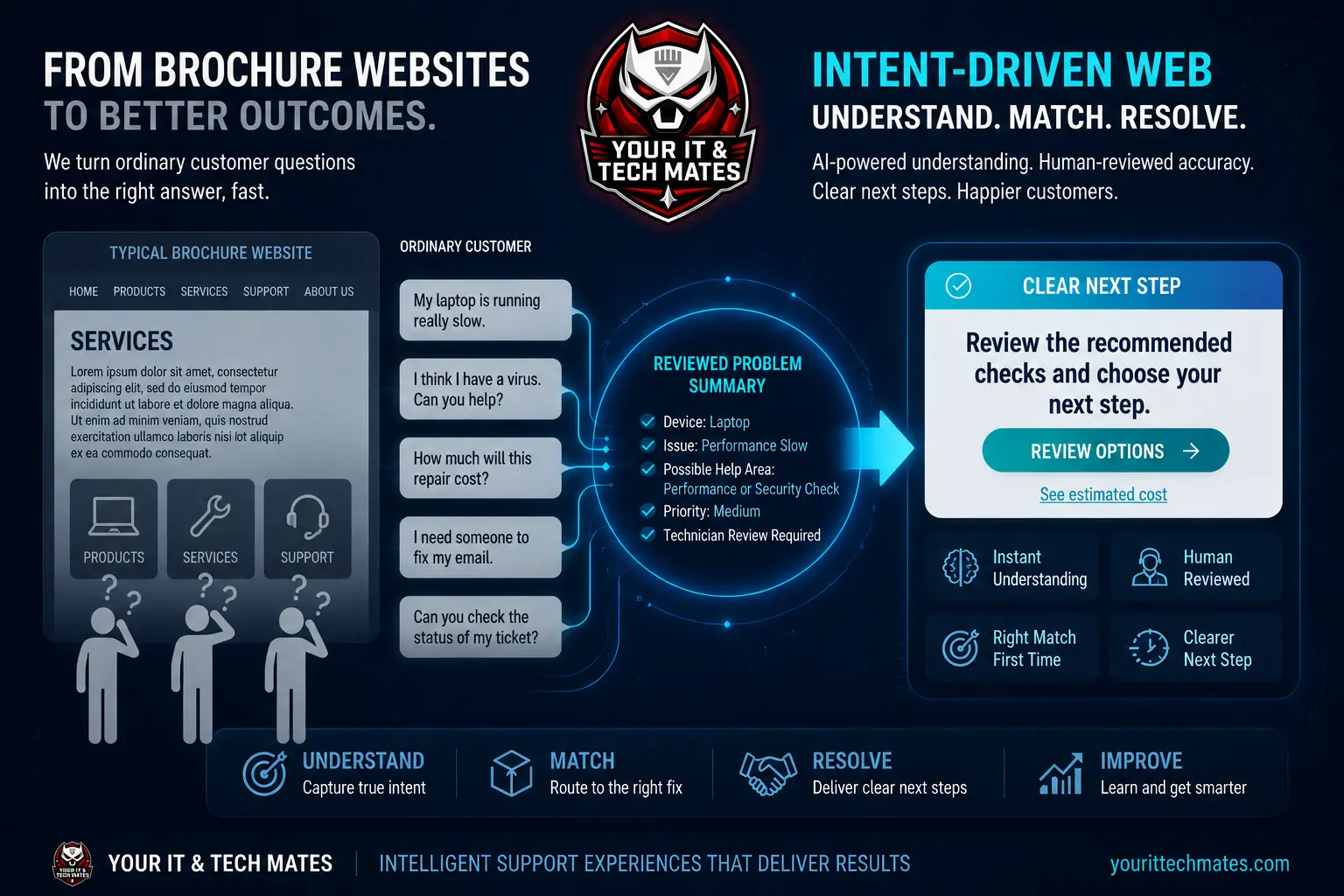
Quick answer
An intent-driven website starts with what a visitor wants to achieve rather than forcing them to translate their problem into your menu structure. It can use plain-language choices, ordinary website rules or bounded AI to identify a reviewed help area, carry useful context and present a small number of relevant next steps. The customer still decides whether to continue, and people remain responsible for final advice, prices, submissions and paid work.
From a brochure website to a guided customer journey
A brochure website mainly publishes pages. It may describe products and services clearly, but the visitor still has to browse, compare categories and decide which page or form matches the situation.
An intent-driven website adds a controlled interpretation layer. Instead of beginning with “Which department do you want?”, it can begin with “What happened?” or “What are you trying to do?” The answer helps the site bring forward approved information and actions that already belong to the business.
This does not mean replacing every menu or page. People who know where they want to go should still be able to browse normally. Intent-based help is another clear entrance, not a gate.
The four parts of an intent-driven website
- Understand the goal. Accept ordinary wording or a small set of clearly labelled situations.
- Match it to a reviewed help area. Use known services, guides, safety pathways and business rules rather than inventing a destination.
- Carry only useful context. Keep the customer from immediately repeating the same basic information, without treating public browsing as verified identity.
- Offer a controlled next step. Present approved content or actions and let the customer choose whether to continue.
Does it need AI?
No. Many common intents can be handled with well-written choices and predefined rules. For example, “check my existing request” should lead to the verified customer-help path without needing an AI model.
Bounded AI is useful when customers describe the same need in many different ways or combine several details in one message. Its role can be limited to interpreting or summarising the wording. Normal website logic can then select from reviewed pages, buttons and next steps.
This separation makes the system easier to test and prevents a model from inventing prices, links, promises or actions.
Intent-driven website vs chatbot
A chatbot is a conversational interface. It may answer questions inside a message window, but the rest of the website can remain unchanged.
An intent-driven approach can influence the wider journey: which approved explanation appears first, which form is appropriate, whether the visitor should start a new request or check existing help, and which safe action is most relevant. A chat interface can be one optional part of that approach, but it is not the whole system.
For a detailed comparison, read AI website vs chatbot.
A practical small-business example
A customer writes, “My laptop is running slowly and I am worried it may have a virus.” A useful website can recognise a possible performance or security help area and present reviewed checks or an option to ask for help.
It should not state that malware is definitely present, claim a repair will solve the problem or silently create a booking. The customer can review the options, add more information and decide whether to submit a request. A technician confirms diagnosis, scope and price where required.
Benefits when the design is done well
- Customers can start in their own words instead of guessing internal service names.
- Relevant guidance appears earlier and unrelated choices can be reduced.
- Useful details can follow the journey, reducing repeated explanations.
- Staff receive clearer, more structured enquiries when the customer chooses to submit.
- Safety, pricing and approval boundaries can remain visible at the decision point.
- The normal website and human team still work when an AI service is unavailable.
Important boundaries to keep
- Interpretation is not diagnosis. Show a possible help area and make uncertainty clear.
- Understanding is not submission. A customer question must not silently become a request, booking or order.
- A suggestion is not approval. Final scope, fixed price and paid work stay with the normal accountable process.
- Public context is not identity. Private customer records require the existing verified access path.
- AI output is not the website owner. Approved content, URLs, services and actions remain controlled by the business.
See how to use AI on a website without losing human control for the governance pattern in more detail.
How to start without overbuilding
- Choose one journey where customers regularly hesitate, choose the wrong form or repeat information.
- Write down the small number of safe outcomes and who is responsible for each one.
- Improve headings, choices and forms before deciding whether AI is necessary.
- If AI adds value, limit it to a clear role such as interpreting varied wording or preparing a reviewable summary.
- Test unclear, unsafe and low-confidence inputs as carefully as the happy path.
- Measure whether customers reach the right next step more easily, then expand only when the evidence supports it.
How we apply the idea on our own website
Your IT and Tech Mates has been rebuilding its own customer-help journey around ordinary wording, reviewed help areas, short-lived useful context and explicit customer choices. QuoteMe remains the request path, and human review remains responsible for important advice, scope, fixed pricing and paid work.
Try the intent-driven help on our homepage, read how we turned our own website into a smarter customer help journey, or see the implementation case study: How Your IT and Tech Mates Is Building a Smarter Technology Support Website.
Intent search and keyword search can work together
If you are deciding how customers should find help, compare the two approaches in Intent Search vs Keyword Search. It explains where exact keyword matching is still the best tool and where natural-language intent adds value.
See the latest intent-driven features in practice
Frequently asked questions
What is an intent-driven website?
An intent-driven website starts with what a visitor is trying to achieve, matches that goal to a reviewed help area and presents a small number of relevant next steps.
Is an intent-driven website the same as a chatbot?
No. A chatbot is one interface. Intent-driven design can improve the wider website, including content, navigation, forms and approved actions.
Does an intent-driven website need AI?
Not always. Clear choices and predefined rules can handle common situations. Bounded AI can help interpret varied everyday wording when rules alone are not enough.
Can it automatically diagnose a problem or submit a request?
It should not silently diagnose, submit or approve important actions. A safer design shows a possible help area, explains uncertainty and lets the customer review and choose the next step.
What is a practical first project?
Choose one journey where customers hesitate, select the wrong option or repeat information. Map the approved outcomes first, then use the simplest technology that removes the friction.
Could your website understand customers more clearly?
Tell us where customers get stuck, repeat themselves or choose the wrong path. We can review whether clearer content, website logic, automation, custom software, AI or something simpler, fits the problem.
Continue into the full customer journey
An intent-driven page is one building block. The Intelligent Customer Journeys series follows how intent, context, adaptive presentation and workflow handover connect across multiple pages and customer actions.
New: Intent-Aware Website business series
These newer guides show how content semantics, customer corrections, journey context and readiness signals can work together without turning ordinary browsing into certainty.