
From Missed Call to Repair Updates: A Simpler Way to Get Tech Help
Less phone tag, clearer next steps and more time helping customers. How we are connecting missed calls, enquiries and repair progress at Your IT & Tech Mates.
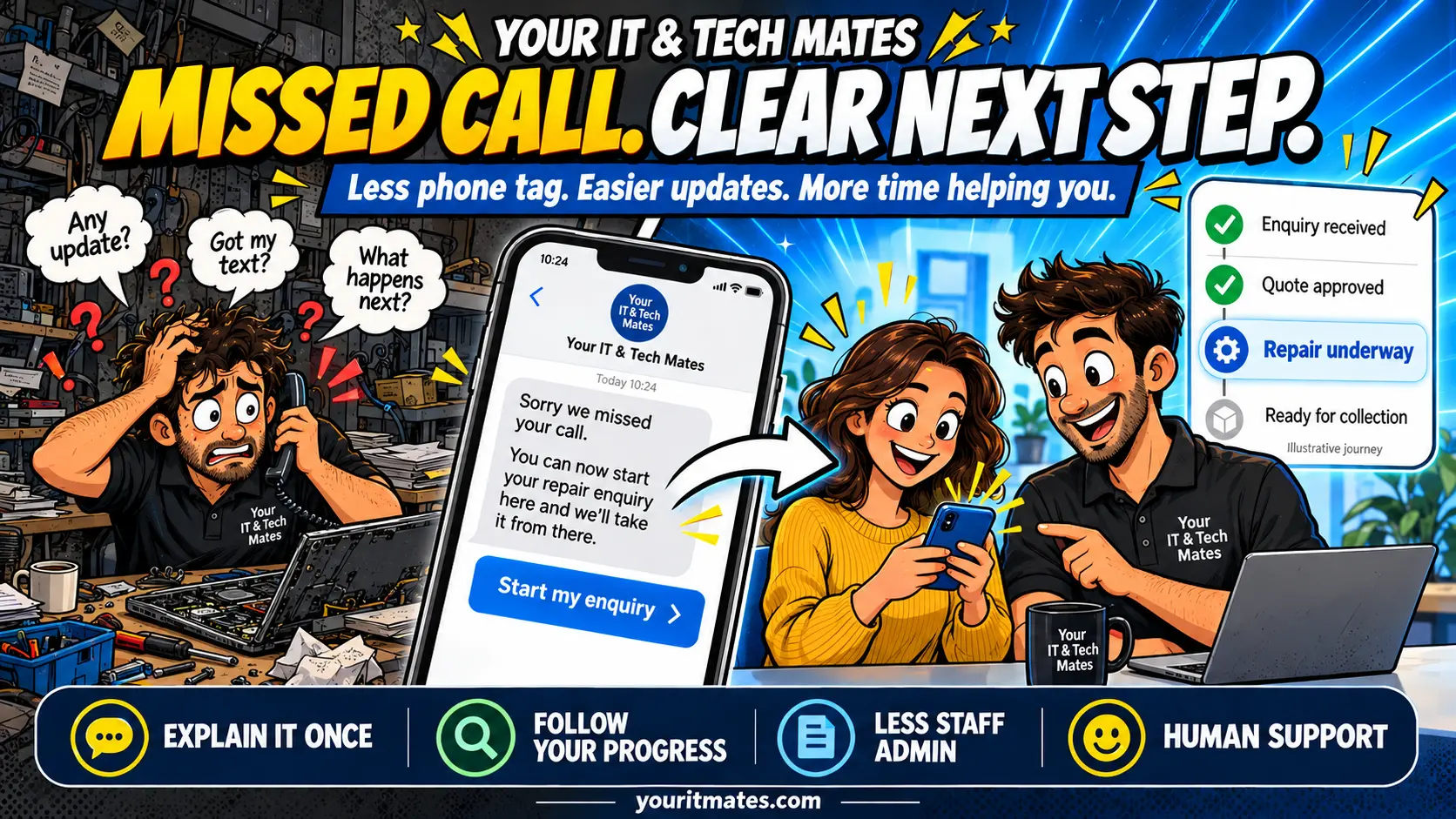
Quick answer
YITM’s missed-call SMS gives customers a link to start a tech help enquiry when we cannot answer. The wider workflow is designed to keep the conversation, quote decision and service progress connected, reducing repeated explanations for customers and routine administration for staff. Real people still review requests, confirm prices and organise the work.
Why we are connecting missed calls with customer requests
A missed call is often someone trying to solve a real problem: a laptop that will not start, unreliable Wi-Fi, or business equipment interrupting the working day. When our team is already helping a customer or working on a repair, answering immediately is not always possible.
Calling back can turn into phone tag. Details arrive in separate texts, and a later “any update?” message may need another search through the history. We are improving our own customer service workflow so the first contact can become an organised enquiry with a clear next step.
The missed-call SMS is the starting point. The broader goal is simple: explain the problem once, continue the same conversation and follow the progress of the agreed work.
How we turned an old office phone into an SMS gateway
We repurposed an existing office Android phone as an SMS gateway: a phone that sends text messages on behalf of our customer service system. Instead of buying another device for this task, we gave equipment we already had a useful new role.
The phone and our website work together. When the connector detects an eligible missed call, it securely notifies our server. The server checks the request and, when appropriate, asks the gateway phone to send a short SMS invitation over the mobile network. That link gives the customer a way to start an enquiry when we cannot answer.
For customers, there is no special app to install for this step. Open the link, explain the problem and continue through the website. The phone provides the text-message entry point; My Tech Help keeps the ongoing enquiry, replies and service information together.
The practical benefit is reuse with a clear purpose. An existing phone can support enquiry capture while the team spends less time manually typing the same invitation. Keeping routine conversations and progress updates in My Tech Help can also reduce the need for repeated SMS follow-ups.
Reusing the handset avoids buying an additional phone for this role, but it does not make messaging free. The setup still needs a suitable mobile plan, power, connectivity, updates and maintenance. The wider time and running-cost benefits need to be measured before we can claim a proven saving.
How the missed-call SMS journey works
- Open the SMS invitation. For an eligible missed mobile call, the connector can send a link to our enquiry entry page. The text gives you a way to continue when talking is inconvenient.
- Describe what is happening. Use everyday language in QuoteMe. Answer useful questions, add a relevant photo or file if helpful, and review the summary before choosing to send it.
- Continue in My Tech Help. Keep questions and replies with the existing request. If asked to sign in, use the email address attached to the enquiry.
- Review the proposed work. When a quote is available, check the scope and total, ask a question, or explicitly accept or decline it.
- Wait for the staff handover. An authorised staff member creates the job order after verified acceptance and confirms the service arrangements. Accepting a quote does not automatically book an appointment or take payment.
- Follow the service updates. Once an order exists and staff publish updates, use the service progress page and the same conversation to see the current next step.
This is the connected journey we are building and checking. Missed-call SMS delivery has been confirmed in a controlled handset test. Checks across returning customers, email sign-in, quote approval and service progress are continuing; this is not a promise that every call or message will be delivered.
Returning to an enquiry should feel like continuing
Keep the original SMS so you have a convenient way back. The general entry link does not identify you or reveal private request details on its own. You may need email sign-in again, especially on another browser or after your session expires.
For an existing problem, choose Continue my conversation rather than sending another enquiry. If you have several requests, choose the relevant one. An unsent enquiry may offer Continue your unsent enquiry on the same browser; it is still a draft until you review and submit it.
Keeping the history together helps the next staff member understand what you reported and what has already been discussed. We may still need to ask new questions when symptoms change or a technician needs more detail.
Fewer calls to chase repair progress
Customers should not have to call simply to find out what happens next. A useful service update explains the current stage, what the team is waiting for and whether the customer needs to do anything.
For example, an update might explain that a quote needs a decision, parts are being arranged, or collection details need confirming. Progress is only as useful as the information staff publish. If an update is unclear or something changes, reply in the existing conversation so the question stays with the job.
SMS and email can provide short alerts when enabled and appropriate. My Tech Help is the place to continue the detailed conversation. You can still call when speaking to a person is easier.
Where YITM can save staff time
The time saving comes from removing small repeated tasks across a job, while keeping personal support available.
- Fewer calls just to collect the basics: staff can review the device, symptom and contact details before responding.
- Less searching: messages and relevant attachments stay with the request rather than across separate SMS threads.
- Less repeated questioning: the next team member can read what the customer has already explained.
- Clearer quote decisions: staff can check the recorded decision against the relevant quote instead of interpreting a disconnected “yes”.
- Better handovers: the enquiry, agreed work and job progress provide context when another staff member takes over.
- Fewer progress-chasing interruptions: current customer-facing updates can answer routine questions before another call is needed.
That can create more time for reviewing requests, carrying out repairs and helping customers who need a conversation. It may also reduce administration that otherwise spills into the evening.
What about cost savings?
Time saved can increase the capacity of a small team. It does not automatically become a cash saving or a lower repair price. There are still costs for the mobile service, messaging tools, hosting, support and maintaining the workflow.
Illustrative example, not a measured YITM result: saving five minutes on each of 60 enquiries would free 300 minutes, or five staff hours in a month. The actual benefit depends on how many enquiries use the workflow and how much handling time it removes.
We can assess the result by comparing average handling time per enquiry, calls asking for progress, repeated data entry and weekly administration hours before and after adoption. Any net cost-saving claim needs to account for the ongoing running costs.
AI assistance with people responsible for the work
AI may help organise an enquiry or clarify wording where useful. Opening the general SMS entry link does not itself make an AI request. The customer reviews the enquiry before submitting it, and the team remains responsible for reviewing the problem and confirming the work.
A prepared request is not a diagnosis, guaranteed repair price or booking. Quote approval is a separate customer decision, and order creation remains a staff action. Read more about why we give helpful guidance before asking for an enquiry.
Local tech help in Epping and Melbourne North
Your IT & Tech Mates helps homes and small businesses around Epping, Wollert, Mernda and Melbourne’s northern suburbs. Whether you need computer repairs in Epping, laptop repair help, or MacBook repairs, start with what is happening rather than trying to diagnose it yourself.
Tell us your suburb and the support you need. Our team will confirm suitable options and availability. The digital enquiry path is there to make the handover easier; phone contact remains available if you prefer to talk.
Introducing the Missed-Call SMS & Enquiry Connector
For other businesses, we call this service the Missed-Call SMS & Enquiry Connector. It gives eligible missed callers a clear way to continue with an enquiry, using the business’s own suitable form or customer system. YITM SMS Connect is the underlying SMS integration product.
Our own My Tech Help journey is one example. Another business can keep its existing CRM, booking or job-management software. We assess a missed-call reply and enquiry handover first; reminders, incoming replies and job alerts can be considered separately where supported.
Keep your CRM with a custom API or webhook connection
For other businesses, the Missed-Call SMS & Enquiry Connector can use custom API and webhook integration with your current CRM platform, where supported. Your staff can keep the customer record in the system they already know, while the SMS connection helps the caller take the next step. The potential benefit is less copying of enquiry details and fewer manually typed follow-up messages. We review your CRM’s interfaces, access and required events before agreeing the setup; this does not promise compatibility with every platform.
Explore the Missed-Call SMS & Enquiry Connector service · Read how the connector can fit your existing CRM
Could your business benefit from the Missed-Call SMS & Enquiry Connector?
Powered by YITM SMS Connect, the service can suit tradies, local clinics and other small service businesses that need a clear follow-up path when the team cannot answer. Compatibility and staff responsibilities are confirmed before setup.
A plumber under a sink in Epping, an electrician on a ladder in Wollert, or a repair team helping someone at the counter cannot always stop to answer. Some callers may try another business rather than leave a message. A useful SMS gives eligible missed callers a way to describe the job while the owner finishes the task in front of them.
For YITM, the link starts the QuoteMe and My Tech Help journey described above. For another business, it can point to its own suitable enquiry form or supported CRM workflow. Photos, callback preferences and custom API or webhook connections are included only where agreed and supported.
Your IT & Tech Mates can help you plan and build a missed-call SMS and customer enquiry workflow for your business. We start with how your team works, then scope a practical service that connects the first enquiry with staff follow-up and customer updates.
- Give missed callers a next step: a short SMS can invite eligible callers to describe the job while you are unavailable.
- Collect useful information earlier: ask for the service needed, location and job details before staff respond.
- Reduce repeated admin: keep the enquiry and its conversation together, with an owner and a clear next action.
- Make quoting and updates easier to follow: assess how customer decisions and progress information can connect to your existing process.
- Consider equipment you already own: a suitable spare office Android phone may be useful as the gateway, subject to compatibility and reliability checks.
Explore the Missed-Call SMS & Enquiry Connector service
What our service can include
The practical goal is fewer missed opportunities, less repeated typing and a clearer staff handover. An SMS acknowledgement does not guarantee a customer will wait or book, and delivery can fail. We test the agreed workflow and explain setup and running costs before rollout.
Depending on the agreed scope, we can help with workflow mapping, gateway setup, enquiry forms, customer messaging, connections to existing systems, testing and staff handover. Ongoing support and maintenance can be agreed separately. We confirm suitability, scope and price before paid work starts.
The aim is to save staff handling time and make it easier for customers to take the next step. Results depend on your enquiry volume, current systems and staff follow-up; we agree a practical success measure before a pilot rather than promise a fixed saving or more bookings.
Start with one customer service bottleneck
Tell us what happens when you miss a call, where the enquiry goes and which follow-up takes the most time. We support businesses around Epping, Wollert, Mernda and Melbourne North and can review whether a small pilot is a sensible starting point.
Discuss the connector for my business
See how our Workflow Improvement Pilot works · Read the connected customer workflow guide
Frequently asked questions
Can Your IT & Tech Mates set up a similar workflow for my business?
Yes. We can assess your missed calls, enquiry handling and customer follow-up, then scope a suitable workflow pilot. Depending on the agreed scope, this can include gateway setup, enquiry forms, messaging, integrations, testing and staff handover. Suitability, price and any ongoing support are confirmed before paid work begins.
How does an old office phone become an SMS gateway?
We repurposed an existing office Android phone to send SMS invitations on behalf of our customer service system. The server checks an eligible missed-call event and asks the gateway phone to send the text over the mobile network. Customers open the link in their browser; they do not need to install the gateway software.
What happens if Your IT & Tech Mates misses my call?
For eligible missed mobile calls, our connector can send an SMS with a link to start an enquiry. Delivery depends on the phone, mobile network and service availability. If no text arrives, you can start directly through QuoteMe or contact us.
Do I need to explain my problem again when I return?
Continue the existing enquiry in My Tech Help so the team can read the earlier details and replies. A technician may still ask clarifying questions. If you have several enquiries, choose the right one before replying.
Can I return through the original SMS link?
The SMS link provides a return path to My Tech Help. You may need to sign in using the email address attached to your enquiry. Use the same account and select the existing request instead of submitting another enquiry.
Does accepting a quote automatically book a repair?
No. Accepting the current quote records your decision. An authorised staff member still creates the job order and confirms the service arrangements. Quote acceptance alone does not confirm an appointment or take payment.
How can the workflow save staff time?
Keeping enquiry details, messages, quote decisions and job progress together can reduce repeated questions, searching across SMS threads, duplicate entry and progress-chasing calls. These are intended benefits; YITM has not yet published measured time or cost savings.
Is this an AI repair diagnosis or an instant quote?
No. AI may help organise the wording of an enquiry where useful. A real person reviews the problem and confirms the diagnosis, scope and price before paid work starts.
Can I still speak to someone about local tech help?
Yes. Phone support remains available. Your IT & Tech Mates helps customers around Epping, Wollert, Mernda and Melbourne North; the team confirms the suitable service option and availability for each request.
Related reading
Tell us what you need a hand with
Start an enquiry or return to My Tech Help. A person reviews your request before work and pricing are confirmed. Please keep passwords, PINs, banking details and one-time codes out of messages.
Continue the YITM workflow automation case studies
These companion case studies build on the original QuoteMe customer-intake example. Follow the practical journey from the first question to staff follow-up and the lessons we are learning.
- Part 1 — Start with the customer’s own words
- Part 2 — From Missed Call to Next Step: YITM’s SMS Enquiry Automation
- Part 3 — Meet YITM’s Virtual Receptionist: A Friendlier First Step for Tech Help
- Part 4 — One Conversation, Less Back-and-Forth: Inside YITM’s Customer Workflow
- Part 5 — Automate, Learn, Improve: Lessons from Building YITM’s Customer Workflow