
Turn a missed call into a clearer customer enquiry
Missed-Call SMS & Enquiry Connector is a setup service for businesses that want to give eligible missed callers a useful next step. A short SMS can point customers to your enquiry form or supported customer system, so staff have useful details before following up.
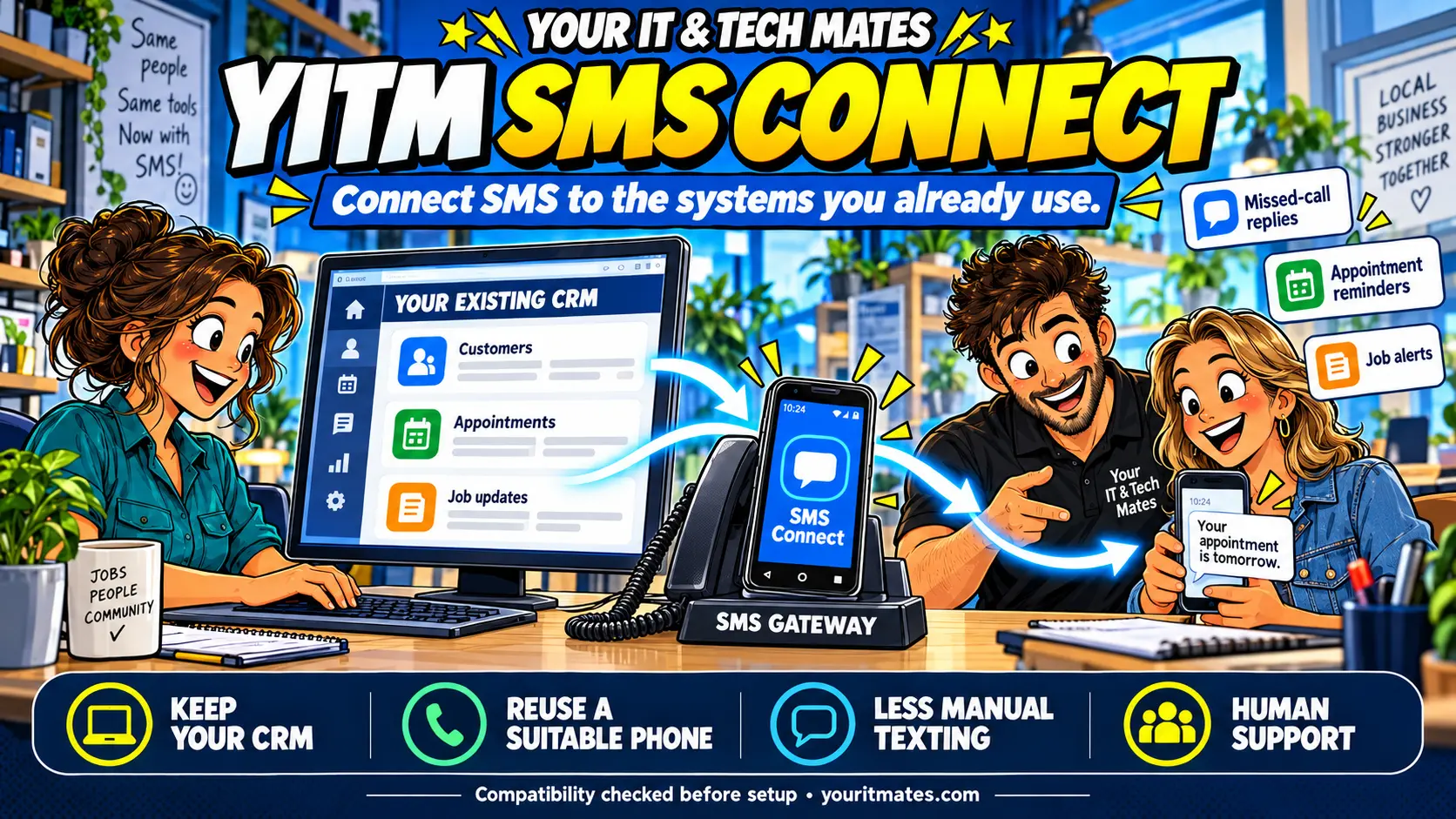
The SMS integration is powered by YITM SMS Connect. We assess your existing CRM, booking tool or job-management software and may be able to reuse a suitable office Android phone as the gateway. Your CRM can remain the main customer record; a new form or customer portal is optional and separately scoped.
Start with one message type. Compatibility, setup effort and delivery time depend on your software, phone arrangement and integration access; we confirm these before quoting.
Busy on the job? Give missed callers a next step
A plumber under a sink in Epping or an electrician working up a ladder in Wollert cannot always answer safely. A caller who needs help may try another business rather than leave a voicemail. That can mean an enquiry you never get the chance to discuss, even after spending time and money attracting it.
The Missed-Call SMS & Enquiry Connector gives eligible callers another way to reach you: a short text with a clear enquiry link. They can explain the job while your team focuses on the work in front of them, ready for a person to follow up.
Keep your CRM. Connect the SMS channel.
Where your software supports an API, webhook or suitable integration, an agreed event can ask the gateway to send a message. The customer receives an ordinary SMS. Delivery-status handling and any return of incoming SMS to your CRM are separately checked and scoped.
Custom API and webhook integration with your current CRM
YITM SMS Connect can be configured for custom API and webhook integration with your current CRM platform, where it provides suitable interfaces and permissions. This lets your team keep its familiar customer system and can reduce manual copying between enquiry records and SMS messages. We check compatibility, message triggers and access before quoting; incoming replies and delivery-status updates are separately scoped.
First contact
Missed-call replies and enquiry acknowledgements can give customers a useful next step.
Appointments
Use agreed booking events for reminders or changes, where your system supports them.
Job updates
Send a short progress or collection alert from a staff-approved event.
Incoming SMS
Review whether replies can be added to the right CRM record. Two-way integration is not assumed.
Who this service suits
For tradies, local clinics, appointment-based teams and small B2B service businesses across Epping and Melbourne North, a missed call can create more follow-up work. We assess whether an SMS invitation and a clear enquiry handover fit your existing process.
Tradies and onsite teams
Give callers a way to describe the job and suburb while you are working. Explore our missed-call guide for tradies.
Repair and service businesses
Keep symptoms, customer questions and the next action with one request, so another staff member can understand the history.
Cleaners and mobile services
Collect the location, type of service and preferred contact details before arranging a callback or assessment.
Small offices and busy owners
Reduce manual copying between messages and a follow-up list. Assign enquiries so responsibility is visible.
One example: missed call to an organised enquiry
- Eligible missed call. The agreed call-handling setup detects a missed call that can be followed up.
- Helpful SMS reply. A configured message gives the caller an enquiry link and a clear next step. Timing and delivery depend on the phone setup, network and connectivity.
- Useful job details. Your enquiry page can collect the service, suburb and job description, with photos or a callback preference where those fields are included. Customers review their details before submitting.
- A clear staff handover. Where supported and scoped, the enquiry reaches your existing CRM or agreed staff inbox through a custom API or webhook connection. Your team reviews it and follows up when available.
- Quote and job updates, where scoped. Agreed connections can keep customer decisions and progress with the request.
The hero image shows an example workflow. Your customer pages, permissions and integrations are scoped to your business; this is not automatic access to YITM’s customer system.
What the connector setup can include
Workflow and phone review
Map your current number, call handling, enquiry channels, staff responsibilities and recurring admin.
SMS gateway and message setup
Check a suitable gateway option, configure the agreed missed-call trigger and write a concise business message.
Enquiry capture and follow-up
Scope a form or request page, contact preferences and a clear staff owner. Discuss verified access for private conversations.
Testing and staff handover
Test agreed delivery scenarios, duplicate prevention and failure handling. Explain daily checks and how staff continue the enquiry.
Website, CRM, quote and job-management integrations are assessed separately. We confirm the scope, access needs and costs before promising compatibility. Start with a Workflow Improvement Pilot if a broader change needs testing.
Give a suitable office Android phone a useful new role
An SMS gateway is a device or service that sends text messages on behalf of your business system. A suitable existing Android office phone may be able to do this through its mobile connection.
We used this approach in our own YITM workflow. Read how we connected missed calls with customer enquiries and repair updates. That is our implementation story, not a claim that every phone or business phone system works the same way.
Before recommending reuse, we check the handset’s support and condition, permissions, mobile plan, power, internet connection and expected message volume. We agree what happens when the phone is offline and how failures are noticed.
Reusing equipment may avoid buying another handset. Mobile service, messaging, hosting, maintenance and staff follow-up still have costs. Customers use the enquiry link in their browser; they do not need the gateway software.
Where your team could save time
The aim is to make the first response useful and the follow-up easier to manage. Staff can spend less time typing invitation texts or collecting the same basics, while customers get a clear way to continue.
Less manual texting
Reduce typing the same first-response invitation after each missed call.
Fewer repeated questions
Collect the service, location and problem before a staff member responds.
Clearer ownership
Keep a request and its next action visible instead of relying on memory or scattered messages.
Easier progress follow-up
Where customer updates are included, publish the next step so routine questions have a clear place to go.
These are intended benefits, not measured savings for your business. For the pilot, agree a useful measure such as handling minutes per enquiry or the number of requests missing a follow-up, then compare it with your baseline.
Clear scope, costs and responsibilities
1. Review
Tell us where calls arrive, the systems you use and the follow-up that takes time.
2. Quote
Agree the setup, exclusions, testing criteria, responsibilities and price before paid work.
3. Pilot and handover
Test the agreed workflow before rollout and show staff how to use it and handle exceptions.
4. Support decision
Confirm any ongoing support, maintenance and recurring third-party costs separately.
Message delivery depends on the handset or provider, mobile network and connectivity. We review message eligibility, repeat-message limits, opt-out handling and delivery checks as part of the agreed scope. Staff remain responsible for timely replies and business decisions.
Phone support can remain available. Quotes, appointments and paid work need the approvals agreed for your business; an automatic text does not make those commitments.
You do not have to replace a suitable existing CRM just to add an SMS connection. We scope the missing step rather than assume an enterprise software rollout. Setup, integration access, mobile service and ongoing support can still have costs, which we explain before paid work.
Local setup help across Melbourne North
Based around Epping and Wollert, Your IT & Tech Mates supports small businesses across Melbourne’s northern suburbs, including Mernda and Campbellfield. Tell us your location so we can confirm suitable remote or onsite help and availability.
We can review one missed-call problem or assess how it fits your broader business IT setup and software and workflow needs. See our service areas.
Frequently asked questions
Do we need to replace our CRM or move to YITM’s customer system?
No. YITM SMS Connect is scoped to add an SMS channel to your existing workflow. Your CRM can remain the main customer record. A new enquiry form or customer portal is optional and separately scoped.
Which CRM systems can YITM SMS Connect integrate with?
We assess your specific software, its API or webhook support, integration permissions and the events you want to use. No particular CRM is guaranteed compatible before that review. If integration access is limited, we discuss a smaller approach or explain why it is not suitable.
What is a missed-call SMS service?
It connects an eligible missed call with a short text giving the caller a clear next step, such as opening your business enquiry form. The exact triggers, message wording and follow-up process are agreed for your business.
Can we reuse an old office Android phone?
Possibly. We first check the handset, Android support, permissions, mobile service, power, connectivity and suitability for the intended workload. A suitable existing phone may be used as an SMS gateway; some devices or phone systems need a different approach.
Will this work with our existing business number?
That depends on where calls arrive and how the number is hosted or forwarded. Tell us whether you use a mobile, landline or cloud phone system. We review compatibility before proposing a setup or changes to your number.
Do our customers need to install an app?
The enquiry-link approach lets customers open a web page in their browser. Continuing private conversations or viewing job information may require sign-in or verification, depending on the agreed system.
How much does missed-call SMS setup cost?
Setup is quoted after reviewing your phone arrangement, enquiry workflow, integrations and testing needs. We explain setup charges, mobile or messaging costs and any optional maintenance separately before paid work begins.
Can this save staff time?
It is designed to reduce manual invitation texts, repeated questions, copying details and routine follow-up. We agree a baseline and a success measure for the pilot. Actual time or cash savings depend on enquiry volume, adoption and running costs.
Can the system approve quotes or book jobs automatically?
That is not assumed in this offer. Customer approvals, staff decisions and exceptions remain explicit. We agree who can issue a quote, accept it, create an order or confirm an appointment before implementing those steps.
Do you help businesses outside Epping?
We work with businesses around Epping, Wollert, Mernda, Campbellfield and Melbourne North. Tell us your location and current setup so we can confirm remote or onsite suitability and availability.
Could the Missed-Call SMS & Enquiry Connector help your business?
Tell us your CRM or business software, phone arrangement and the first message you want to automate. We will review compatibility and confirm the scope and price before paid work begins.
Do not include passwords, API keys, private customer records or banking details in the enquiry.