Why Our AI Receptionist Needs to Remember the Conversation
See how YITM designs conversation memory for follow-ups, corrections and multi-turn QuoteMe enquiries without asking customers to repeat their problems.
Quick answer
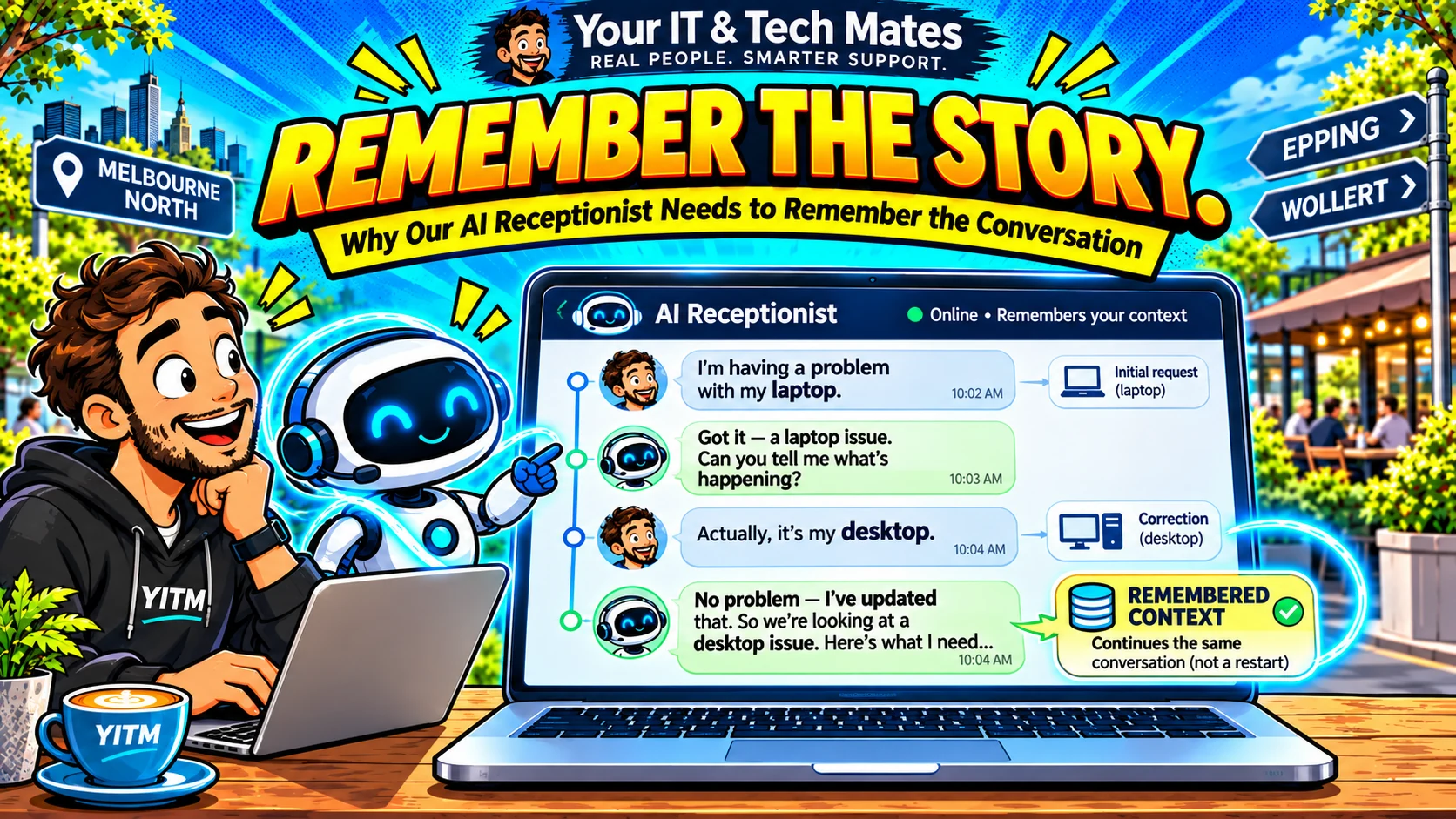
A customer says their laptop will not start. A moment later they add, “The light comes on briefly.” Then they correct themselves: “Actually, it’s my desktop.” Those are not three unrelated enquiries. They are one developing explanation, and the assistant should treat them that way.
Evidence note: YITM build experience and labelled tests are distinguished from unverified live-customer savings or conversion outcomes.
The customer problem behind this workflow
Many basic chat forms analyse only the latest message. “The light comes on briefly” is almost meaningless without the earlier description. When context disappears, staff must reconstruct the story and customers start again.
Remembering everything forever would create a different problem: too much personal data, stale facts and mixed-up cases. Useful memory should be scoped to the current enquiry.
How we designed the YITM workflow
YITM’s visit state records an expiring, redacted draft and structured discovery details. The conversation engine can carry the known problem forward, while explicit corrections replace the wrong device rather than stacking contradictory facts.
The assistant distinguishes a follow-up from “Start a separate enquiry about our office Wi-Fi.” In the first case the conversation stays together; in the second it creates a new thread of work. Private account history remains protected behind authentication, not guessed from public chat context.
What we built, tested and learned
Our regression labels included an extended startup journey: a computer that would not turn on, a brief indicator light, a collection question and a laptop-to-desktop correction. Those tests check that the same case survives and that collection is not silently confirmed.
A newer browser test exposed another risk: the system could ask the right first question yet still lose the enquiry when the customer answered. That distinction shaped our acceptance criteria: a conversation is only reliable when the browser, visit state and eventual QuoteMe draft agree.
What this could improve for YITM and other businesses
For YITM, coherent context should mean fewer repeated questions and a clearer technician brief. Measuring that benefit requires observing actual customer enquiries; synthetic passes are not a saving calculation.
Other service businesses can adopt the principle without adopting a large model: maintain a small, time-limited record of confirmed facts, record corrections, and separate new requests clearly.
Local business perspective: Epping, Wollert and Melbourne North
Our own service work in Melbourne’s northern suburbs provides a practical test bed: customers want a clear next step, especially when they cannot describe a technical problem. This article is a first-party YITM workflow example, not a claim that an identical automation suits every local business. A café, clinic or trade service should map its own permissions, customer journey and response expectations before copying the pattern.
An example decision tree for small businesses
Visitor: “Do you service Wollert?” Answer from the approved service-area page; no model is needed. Visitor: “Can you help Dad use his tablet?” Ask about the type of help and permission to act for another person; use the appropriate service guide.
Visitor: “The thingy flashes and nothing works.” Clarify the device and what the customer sees; a governed model may help interpret unusual wording, but it should never supply a diagnosis unsupported by the customer's description.
Visitor: “Is my repair ready?” Stop the public-answer path and use the authenticated existing-request workflow. Private status is not public knowledge, even if the model can produce a plausible answer.
What the customer should see before sending
A useful draft identifies the device or service, the problem in the customer's own terms, any additional concerns and a clear explanation of what has not been confirmed. The customer should be able to edit details that the assistant misunderstood.
A quote enquiry is not a repair authorisation. “Please contact me” is not a deposit approval, and “tomorrow is good” is not a confirmed technician appointment. The receiving system must preserve those distinctions.
Frequently asked questions
Will the assistant remember private account details?
Public chat should not expose private account records; protected requests require an authenticated path.
What happens if the customer changes the device?
The workflow should preserve the symptom and update the device, with the correction visible before submission.
Keep exploring YITM's workflow automation work
Start with our virtual receptionist overview, then follow the engineering details below.
- quoteme customer conversation workflow automation
- quoteme ai virtual receptionist melbourne
- How our website works as a virtual front desk
- Our wider small-business workflow lessons
Behind the Build · all ten articles
- Part 1 — How We Built an AI Receptionist That Asks Better Questions
- Part 2 — Why Our AI Receptionist Needs to Remember the Conversation
- Part 3 — AI or Rules? How We Keep Our Virtual Receptionist Practical and Affordable
- Part 4 — From AI Conversation to QuoteMe: A Safer Customer Handover
- Part 5 — When AI Gets It Wrong: How We Test and Improve Our Receptionist
- Part 6 — One Customer, Two Problems: Designing AI for Multiple Service Requests
- Part 7 — Why Our AI Receptionist Cannot Book Work or Approve Prices on Its Own
- Part 8 — How We Connect Website Enquiries, QuoteMe and Staff Follow-Up
- Part 9 — How We Measure Whether an AI Receptionist Is Actually Helpful
- Part 10 — Start With One AI Workflow: What Our Small Business Learned
Could your business use a clearer customer workflow?
Tell us which enquiry, follow-up or handover consumes time for your team. We can discuss a small, human-reviewed workflow that fits your current tools. Please do not send passwords, API keys or private customer records. We confirm scope and pricing before any paid work.