
Device
Confirm the collected device matches the request.
AI can help check photo quality, suggest device-label details, organise accessories and prepare a handover summary. The technician and customer still confirm the real device, condition, authority, safety and next step.
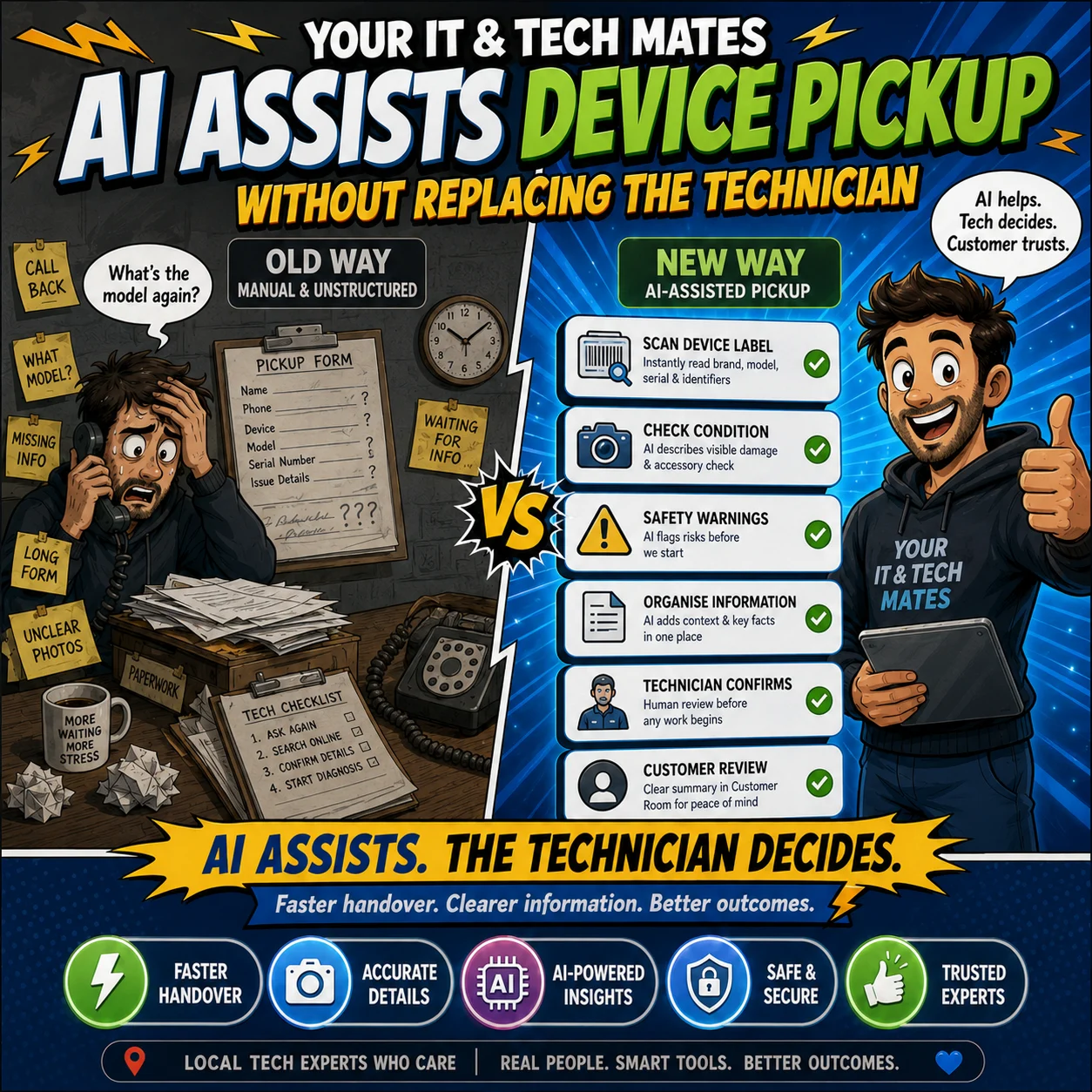
AI can help improve photo quality checks, suggest device details, organise an accessory check and prepare a handover summary. Human review confirms the device, condition, authority, safety and every pickup or return decision.
A device pickup may need to identify the device, record visible condition, list accessories, confirm who is authorised, note urgent data or safety concerns and explain the next step.
AI may reduce repetitive typing and highlight missing information. It cannot decide that a device is safe, accept disputed accessories, infer authority or replace the technician’s judgement.
For the wider workflow, read why Smart Assist still needs technician checks.
A label image is useful only when the relevant text is visible, in focus and not hidden by glare. The assistance can suggest that the customer retake a photo rather than pretending an unclear label is reliable.
Device-label confidence describes how clear the available evidence appears. A low-confidence suggestion stays editable and must be checked against the real device, its label or its About screen.
A model label answers “which device is this?” A cracked screen or damaged hinge photo answers “what can be seen?” Keeping them separate prevents a suggested model detail from looking like a damage diagnosis.
AI may describe visible marks or flag a mismatch between the written device description and the photo. The technician confirms the actual condition and whether more testing is required.
Confirm the collected device matches the request.
Record the charger, case, stylus, adapter or other item physically received.
Confirm the customer or authorised representative may approve, pay or collect.
Review visible marks with the customer or authorised representative.
AI may organise these details, but it must not assume ownership, authority or that an accessory was supplied.
A note or photo may raise a possible safety flag such as swelling, liquid exposure, smoke or burning, heat damage or sharp glass. It may also flag a mismatch between the device named in the request and the available photo.
The technician decides whether the device should be powered, charged, transported, isolated or referred for specialist handling. The workflow continues manually when AI is unavailable.
The customer-facing summary can show the device type, a masked identifier where useful, visible condition, accessories and the agreed next step. It should not expose full serial numbers, private technician notes or unnecessary account identifiers.
Reviewing the pickup record does not approve paid work. Diagnosis, quote approval, payment, appointment confirmation and repair authority remain separate explicit stages.
The return handover can compare the recorded device and accessories, summarise completed work, note visible return condition and explain any ongoing care or warranty information.
AI may help prepare a dispute-prevention summary, but it cannot complete customer sign-off, confirm satisfaction or close the custody record automatically.
| AI-assisted task | Human responsibility |
|---|---|
| Check whether a label photo is readable | Confirm the correct device and identifier |
| Describe visible damage | Inspect the condition and decide safe handling |
| Organise the accessory list | Confirm what was physically received |
| Flag missing authority information | Confirm the customer or authorised representative |
| Prepare the pickup summary | Review accuracy before customer confirmation |
| Prepare a return comparison | Complete the actual return handover and sign-off |
Use tap-first answers and controlled wording help before pickup.
Read the intake, privacy, diagnosis and approval standards.
Back up important data and avoid sending passwords or access codes.
Capture the full device, problem area and useful label.
No. The technician or authorised staff member confirms the pickup and condition.
It may describe visible marks or flag an unclear image, but a technician confirms condition and safe handling.
It indicates how clear the available evidence appears. It is not proof that the model or identifier is correct.
No. Pickup, diagnosis, quote approval, payment and return are separate stages.
A separate return handover checks the device and accessories and keeps customer sign-off explicit.
The normal manual pickup and handover process continues.
Continue from here
These links are selected from the same hub, Intent, service and tool relationships.
Share a tracked referral through TheFixers.APP. Eligibility and rewards remain subject to the referral terms.