
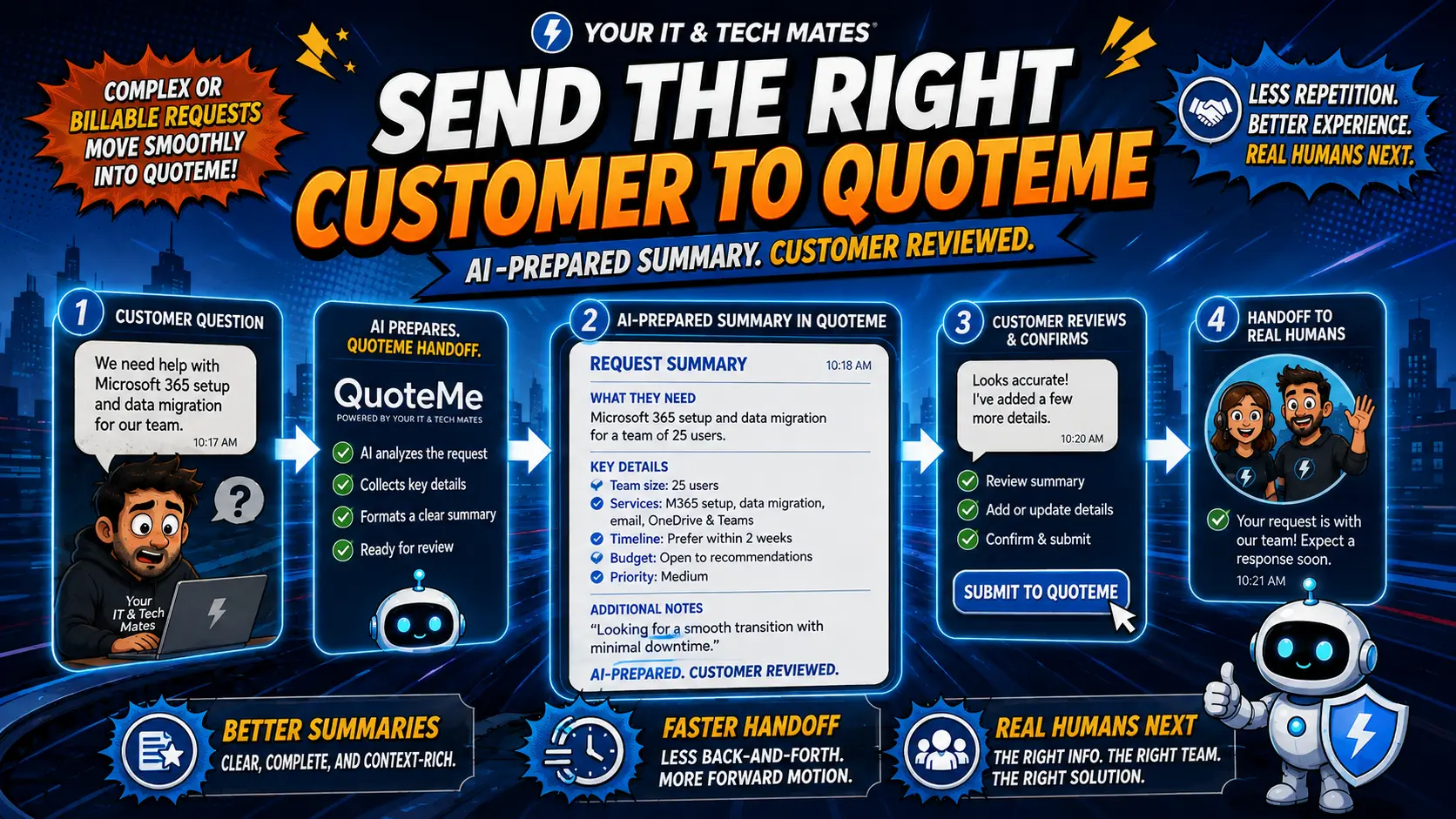
What is the AI QuoteMe system?
Quick answer: The AI QuoteMe system helps a customer explain their tech problem, get an initial estimate range, and send the right details to the business — all before speaking to anyone. It does not replace the technician. The technician still confirms the official quote before any repair work starts.
This is a real system built and used by Your IT & Tech Mates. You can try the QuoteMe system now to see how it works from a customer's point of view.
What this case study covers
What customer intake looked like before
Most customers who contact an IT repair business have the same three questions: How much will it cost? What happens next? When will someone get back to me?
Before the AI QuoteMe system, answering those questions required a phone call or email exchange just to collect basic details. The technician often received incomplete information — wrong device model, missing fault description, no photos — and had to go back and ask again before they could even start thinking about a quote.
This back-and-forth wasted time on both sides. Customers waited longer than they needed to. The admin workload for common, straightforward requests was the same as for complex jobs.
The goal was to fix the intake step without removing the technician from the quote confirmation process. That distinction matters. AI can ask the right questions. It cannot physically inspect a device or make a professional repair assessment.
How the AI QuoteMe system works — from the customer's side
The customer visits the QuoteMe page on the website. Instead of a blank contact form, they are guided through a short, structured conversation.
The AI asks questions relevant to the type of problem. For a laptop screen replacement, it asks about the brand, model, screen size and type of damage. For a slow computer, it asks about the operating system, age of the device and what the customer has already tried. For a phone with a cracked screen, it asks about the model and whether the touch still works.
The questions are short and plain. No jargon. Most customers complete the intake in two to three minutes.
What happens next
Once the customer finishes, the system does three things at once:
The estimate shown to the customer is clearly labelled as an initial range, not a final quote. The technician reviews the summary and follows up to confirm the official quote after inspecting the device.
This is covered in more detail in our guide on how AI provides initial repair estimates without replacing technician quotes.
What AI handles in this system
The AI automation for customer enquiries page covers how the enquiry assistant component works in more detail.
What humans still control — always
This distinction is the difference between a useful tool and an unreliable one. AI assists the process. It does not own the decision.
The full workflow — customer to completed job
Step 1 — Customer completes QuoteMe intake
The customer describes their problem through the guided intake on the QuoteMe page. The AI asks follow-up questions specific to the device type and fault. The customer finishes in two to three minutes.
Step 2 — Initial estimate displayed
The system shows an estimate range based on the information provided. The customer sees a clear message that this is an initial estimate and that the official quote comes after device inspection.
Step 3 — Job summary sent to business
A structured summary is sent to the business team. The summary includes the customer's contact details, device information, fault description and the estimate range shown. The technician is notified.
Step 4 — Technician reviews and confirms quote
The technician checks the summary, inspects the device (in-person or by request for drop-off) and issues the official quote. The customer receives the official quote via the AI quote and cost estimate assistant workflow.
Step 5 — Customer accepts quote
No repair work starts until the customer accepts the official quote. The customer can accept, ask questions or decline.
Step 6 — Repair completed and invoice sent
After repair, the invoice is prepared, reviewed by staff and sent to the customer. If the customer is eligible for a warranty claim on a previous repair, they can raise it through the same system.
What this looks like for a real customer
A customer in Epping has a laptop with a cracked screen. She visits the QuoteMe page, selects "Laptop Screen" and answers the intake questions: Dell Inspiron, 15.6 inch, cracked after being dropped, touchscreen still working.
The system shows her an initial estimate: "Screen replacements on this Dell model typically cost between $180 and $240, subject to device inspection. Parts availability may affect timing."
She receives a confirmation with a reference number. A technician follows up the next morning, confirms the part is available, and sends an official quote for $195 including labour. She accepts the quote. The repair is completed the same day.
She never had to call anyone to get the process started. She had a reference number, an estimate range and knew what to expect — all before speaking to anyone.
Want an AI QuoteMe system for your business?
Your IT & Tech Mates builds practical AI tools that connect with your website, customer forms, quotes, invoices, emails and service workflows.
We keep the process straightforward: customers get easier help, staff get better notes, and the business keeps control of all final decisions.
The same approach that works for IT repairs can be adapted for tradies and service businesses, including plumbers, electricians, cleaners, mobile mechanics and consultants.
Can a similar system be built for your business?
Yes. The core idea — guided intake, initial estimate, structured handover to a human — applies to many service businesses.
A plumber could use it to collect fault descriptions, location, urgency level and property access details before calling the customer. A cleaner could use it to collect job size, property type, special requirements and frequency before preparing a quote. A mobile mechanic could collect vehicle details, fault symptoms and service history before booking.
The AI questions, estimate logic and handover format all need to be tailored to the specific business. But the structure is the same.
Our broader guide on AI integration for small business — why chatbots are only the beginning explains the full picture of what a connected AI workflow can include.
We also cover how AI-guided intake forms reduce admin mistakes — especially useful for businesses where incomplete job details cause problems downstream.
Questions about the AI QuoteMe system
Does AI replace the technician in the quote process?
No. AI provides an initial estimate range based on the information the customer provides. The technician reviews the device, confirms the fault and issues the official quote before any repair work starts. No repair begins until the customer accepts that official quote.
How does the AI QuoteMe system work for a customer?
The customer visits the QuoteMe page, describes their problem, and the AI asks clarifying questions to collect the right details. It then provides an initial estimate range and sends the job details to the business. A technician follows up to confirm the official quote. The whole intake takes two to three minutes.
Can a similar AI system be built for other service businesses?
Yes. The same approach works for plumbers, electricians, cleaners, mobile repairers, consultants and other service businesses. The intake questions and estimate logic are tailored to the specific trade or service. Contact us through QuoteMe to discuss what a system would look like for your business.
What does the AI handle and what does the technician handle?
AI handles: collecting problem details, asking clarifying questions, providing an initial estimate range, sending job notes to staff and triggering follow-up reminders. The technician handles: official quote confirmation, repair decisions, warranty assessments and final billing.
Is the initial estimate accurate?
The initial estimate is a common range based on typical jobs of that type. It helps the customer understand the rough cost before committing to anything. The official quote, confirmed after inspection, is the binding price. If the actual cost turns out to be different, the customer is informed before any work proceeds.
How much does it cost to build a similar AI system?
It depends on the complexity, how many workflows need to connect, and what platforms you already use. Contact Your IT & Tech Mates through QuoteMe to describe your business needs and get an honest assessment with no obligation.
Ready to see how this could work for your business?
Use QuoteMe to describe your business and what you are trying to improve. We will give you an honest answer on what is realistic, what it would connect to, and what it would cost to build.
Continue from here
Useful next steps for this topic
These links are selected from the same hub, Intent, service and tool relationships.