
Quick answer
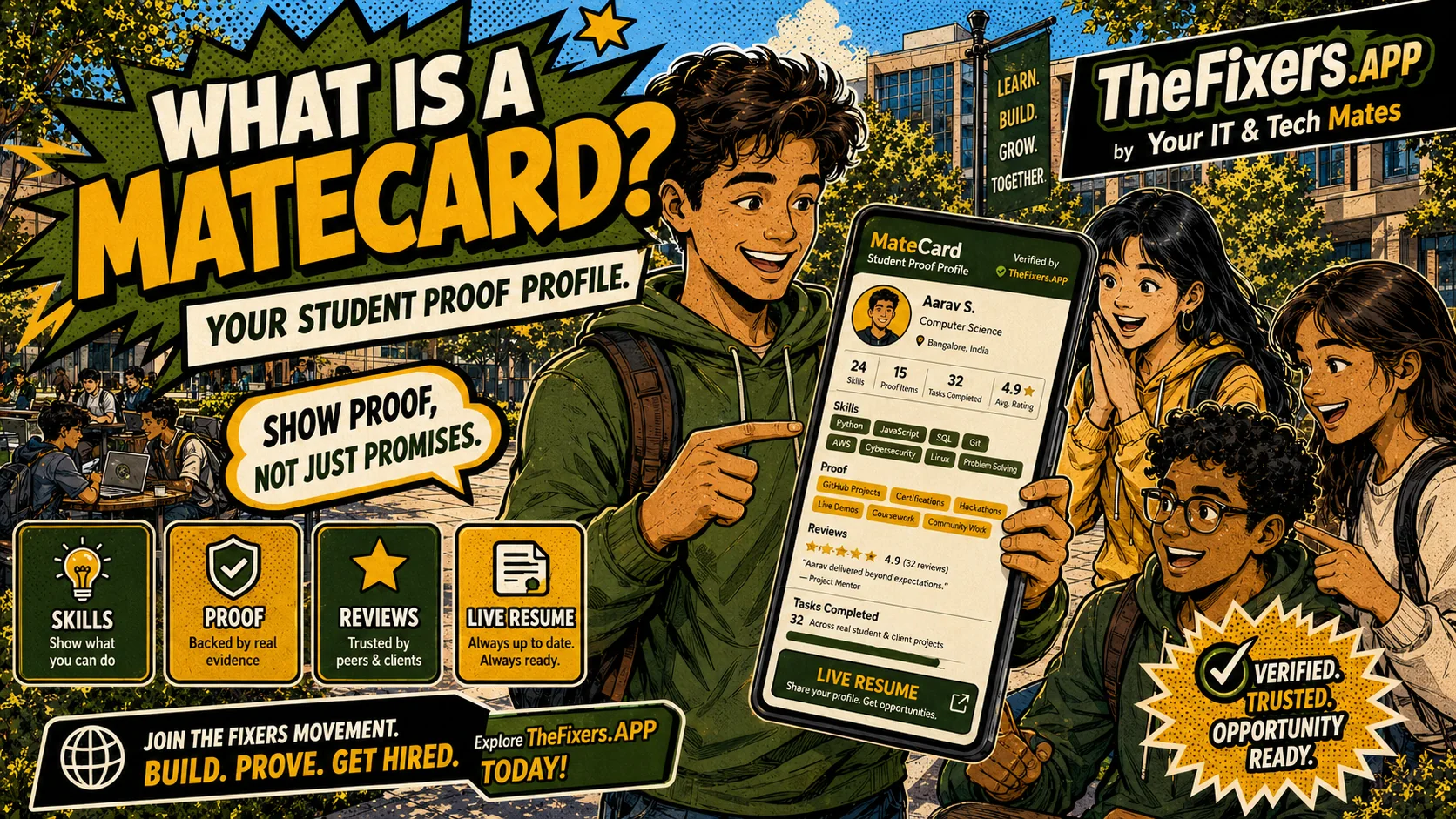
A MateCard is a shareable student proof profile. It helps students show approved skills, Proof Missions, task experience and Live Resume progress in one simple place.
Best for you if
- You want a simple way to show what you can do.
- You are building a resume but do not have much work history yet.
- You want teachers, mentors or employers to see approved proof instead of just a claim.
What you can do today
- Start your MateCard.
- Add a short intro about what you can help with.
- Choose 3 SkillStack areas.
- Pick one beginner Proof Mission.
- Keep private details out of public sharing.
Example: a student starting from zero
A student with no formal work history starts a MateCard, chooses phone setup, laptop help and clear communication, then completes one small Proof Mission. The MateCard now gives them something practical to show instead of a blank resume.
What this helps you show
A MateCard can show approved skills, selected proof, completed tasks, Live Resume examples and safe progress. It is not a guarantee of work, but it gives the student a clearer way to be noticed.
Why this matters to you
Start a simple proof profile without needing a long work history.
The page explains review, privacy and suitability so readers know what happens before anything is shared, assigned or paid.
Readers get a direct next step instead of a long explanation with no clear outcome.
Simple path to get the result
- Start with a short intro that sounds like a real person, not a formal job application.
- Choose three SkillStack areas that match what the student can help with or wants to learn.
- Pick one Proof Mission so the MateCard has a first real example.
- Check what is public before sharing with teachers, friends, family or employers.
Real example
A student who has helped set up a phone, chosen three SkillStack areas and completed one Proof Mission can show a clearer story than a blank resume: what they did, what skills they used, and what they are ready to practise next.
Keep building proof
Student pathway links
Ready to turn this into proof?
Start with one small action, then connect the result to MateCard, SkillStack or Live Resume.
Open My Helper HQ View Student Notice BoardWho benefits most from this?
| User | Benefit |
|---|---|
| Student | Understands what to do next and how the action can strengthen MateCard, SkillStack or Live Resume. |
| Parent or mentor | Can see whether the pathway is safe, practical and realistic for the student. |
| School, agency or provider | Can understand what information is useful for matching, review and opportunity support without exposing private details. |
Who this helps
Students, parents and teachers. This page is written to make the next step clear without exposing private details or promising a result that still needs review.
Why it matters for students
Students often need proof before they have a long work history. This feature gives them a simple way to show progress, skills and useful examples in a safer format.
What a MateCard can show
A MateCard can show approved skills, proof tasks, public feedback, Live Resume progress and safe next steps. It should not show private contact details or unreviewed claims by default.
What stays private
Private contact details, payment information, sensitive notes, unreviewed skills, passwords, identity checks and customer details should not appear in public sharing.
How to start in 5 minutes
Start with a short intro, choose three SkillStack areas, pick one Proof Mission and check the MateCard preview so the student can see a result quickly.
Why a MateCard is different from a normal profile
A normal profile often lists claims such as “good with computers” or “hard working”. A MateCard should make the claim easier to trust by connecting it to visible proof: chosen SkillStack areas, completed Proof Missions, approved task examples and a Live Resume next step.
Student benefit
If you are just starting, the MateCard gives you a way to show progress before you have a long job history. Instead of waiting for a first job, you can begin with small proof-building actions and gradually turn them into a stronger story.
Best next link
After this guide, read how to build a resume without previous work experience.
Common questions
Does this guarantee work or approval?
No. Tasks, payments, provider-readiness and public sharing may need review, suitability checks and permission.
Can private details appear publicly?
Public sharing should only show information approved for sharing. Private contact details, payment details, sensitive notes and unreviewed information should stay private.
How does this help a student?
It helps connect skills, proof, task experience and Live Resume examples so a student can explain what they can do more clearly.
What result can I get from this page?
Start a simple proof profile without needing a long work history. Use the linked room or page to take the next step, then keep approved proof connected to MateCard, SkillStack or Live Resume where relevant.
What should I do first as a student?
Start your MateCard, choose three SkillStack areas, complete one beginner Proof Mission and add one safe proof example to your Live Resume.
Where this guide fits
This page is one spoke in the MateCard hub. Use the hub path below to move from understanding MateCard to choosing skills, completing proof tasks, finding suitable opportunities and sharing safely.