
Quick answer
Start with the business workflow, not the software brand. Map where an enquiry begins, who owns the next step, what information must stay attached to the request, and where a human must review or approve the outcome before automating anything.
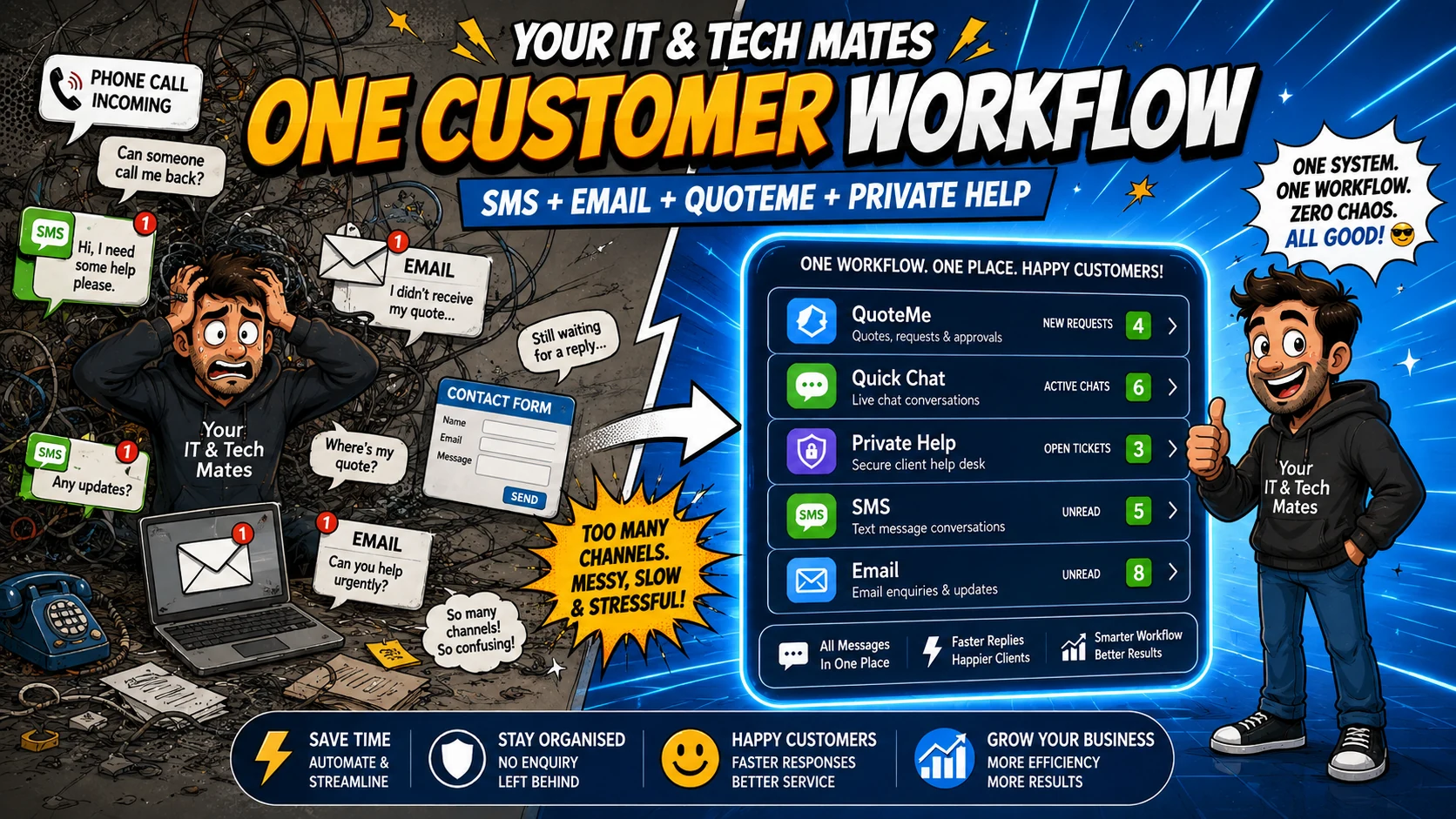
The useful integration is not “more channels”. It is one authoritative customer request behind the channels. At Your IT & Tech Mates, QuoteMe, email and customer SMS can create or continue the same help request; staff work from the same Quick Chat history, while My Tech Help remains the secure place for detailed updates, files and quote-related context.
Tell us what is slowing your business down. QuoteMe gives Your IT & Tech Mates a structured starting point for a human review before any recommendation or paid work.
Start with QuoteMe →The workflow problem we wanted to solve
A customer does not think in software modules. They may start with a website request, send an email because it is convenient, or text a short question from their phone. When each channel owns a separate record, staff have to copy information, search several inboxes and work out which message is current.
For a Melbourne service business, that creates a familiar set of problems: the same customer can appear in several places, a quote can be discussed without the latest context, and staff can spend more time reconstructing the conversation than solving the actual customer problem.
Our design rule: one request, several safe entry points
We kept one canonical customer-help request as the source of truth. QuoteMe is the structured, tap-first entry point. Email can create or safely continue the same request. Two-way SMS can create a request for a new mobile number or append a short customer reply when the number and request can be matched safely.
Quick Chat is the staff workspace for the chronological conversation. My Tech Help is the customer-facing secure thread for detailed technician updates, files and the information that should not be scattered through ordinary SMS or email. A phone call can still be handled by a person, but the ongoing work should be captured in the same request instead of living only in someone’s memory or notes.
What the connected journey looks like
Customer chooses a convenient entry point
QuoteMe, email or SMS can start the conversation without creating separate operational products.
One request becomes authoritative
The customer details, request reference, status and chronological messages stay together.
Staff review in one workspace
Quick Chat gives the team the current request and next action instead of separate channel histories.
Why this approach reduces small-business admin
The main saving comes from removing duplicate handling. Staff do not need to decide whether the “real” customer lives in an email ticket, an SMS conversation or a website lead. The request reference, customer contact, latest activity and conversation history stay together.
That makes handover easier when another staff member needs to help, and it gives automation a safer foundation. Notifications can be automated while pricing, diagnosis, quote approval and paid-work decisions remain explicit human-controlled steps.
What we deliberately keep human-controlled
A connected workflow should not quietly become an automated decision engine. Customer messages can be captured and routed, but they do not approve paid work. AI can help organise wording or prepare drafts, but staff still review what is sent. A fixed quote remains a later reviewed action, and sensitive customer details stay behind the normal secure access checks.
Where another small business could use the same pattern
The pattern suits businesses where customer contact arrives through several channels: electricians, cleaners, repair businesses, consultants, local professional services and mobile service teams. The exact software may differ, but the architecture is transferable: several entry points, one authoritative request, clear status, controlled notifications and one secure place for detailed communication.
Benefits and practical outcomes
The value is not adding more software. It is reducing the gaps between customer contact, staff review, follow-up and the next approved action.
Fewer missed enquiries
SMS, email and QuoteMe can enter the same operational request instead of leaving staff to monitor separate inboxes.
Less duplicate admin
Customer details and conversation history stay attached to one request, reducing copy-and-paste between channels.
Clearer staff ownership
The request status and chronological thread make it easier to see who needs to respond and what happens next.
Safer customer updates
Short notifications can travel by SMS or email while detailed technician content stays in My Tech Help.
Example: one customer contacts the business three different ways
A customer first uses QuoteMe, later sends a short SMS and then checks an email notification. A disconnected setup can make those interactions look like three separate jobs. In the connected Your IT & Tech Mates pattern, safely matched messages continue the same QH request and the detailed conversation stays in My Tech Help. The customer gets convenience without forcing staff to reconstruct the history.
Outcome: one request reference, one chronological conversation and a clearer path from enquiry to technician review and fixed quote.
Practical workflow checklist
- Customer chooses a convenient entry point. QuoteMe, email or SMS can start the conversation without creating separate operational products.
- One request becomes authoritative. The customer details, request reference, status and chronological messages stay together.
- Staff review in one workspace. Quick Chat gives the team the current request and next action instead of separate channel histories.
- Customer gets short notifications. Email or SMS can say that an update is ready without copying every sensitive detail into public channels.
- Detailed work stays in My Tech Help. The customer uses the secure thread for full context, files, technician updates and later quote-related actions.
Key takeaways
- Give customers convenient entry channels without creating separate operational records for every channel.
- Keep one authoritative request, clear status and chronological conversation.
- Use SMS and email for concise transport and notifications; use My Tech Help for detailed or sensitive context.
- Keep quote scope, pricing, approval, payments and paid work under explicit human-controlled steps.
- Map the workflow before adding AI or automation.
Frequently asked questions
Does every SMS create a new ticket?
No. A safely matched SMS can continue an existing active request. A new request should be created only when there is no appropriate request to reuse.
Why keep My Tech Help if customers can text?
SMS is excellent for short entry and notification messages. My Tech Help is better for full context, files and sensitive support information.
Can this automatically approve quotes?
No. Channel integration should not approve a quote, payment or paid work. Those remain explicit customer and staff actions.
Is this only useful for IT businesses?
No. The same one-request pattern can suit many Australian service businesses that receive enquiries through forms, email, phone and SMS.
Where should a business start?
Map the current enquiry-to-quote process first. Identify where information is duplicated or lost before deciding which integrations to build.
Could one connected workflow reduce admin in your business?
Tell Your IT & Tech Mates where enquiries arrive today, what staff copy between systems and where customers are left waiting. QuoteMe gives us a structured starting point so we can review the workflow before recommending integration, automation or custom software.
Related customer-workflow guides
Stop Losing Enquiries: Why SMS, Email and Website Forms Need One Workflow
Learn why disconnected SMS, email and website enquiries create missed follow-up for small businesses, and how one connected customer workflow reduces duplicate admin.
Read guideFrom Message to Quote: A Better Small-Business Customer Workflow
A practical Australian small-business workflow from first customer message to reviewed quote, using structured intake, one request history and secure customer follow-up.
Read guideText Without Chaos: How Customer SMS Can Feed a Real Business Workflow
See how customer SMS can become a trackable small-business help request with safe matching, acknowledgements and My Tech Help follow-up instead of another unmanaged inbox.
Read guideWhy We Keep Sensitive Customer Updates Out of SMS and Email
Why Your IT & Tech Mates uses SMS and email for concise notifications while detailed technician updates, files and quote context stay inside secure My Tech Help threads.
Read guideWant to connect a messy customer workflow?
Start by mapping where enquiries arrive, where the authoritative customer record lives, and which steps genuinely need integration or automation.