
Details become buried
Job descriptions, addresses, device details and customer photos sit inside long message histories.
Smart Customer LeadRoom helps Australian tradies, sole traders and small service businesses move customer messages, photos and follow-ups out of individual SMS inboxes and into one secure, shared lead history.
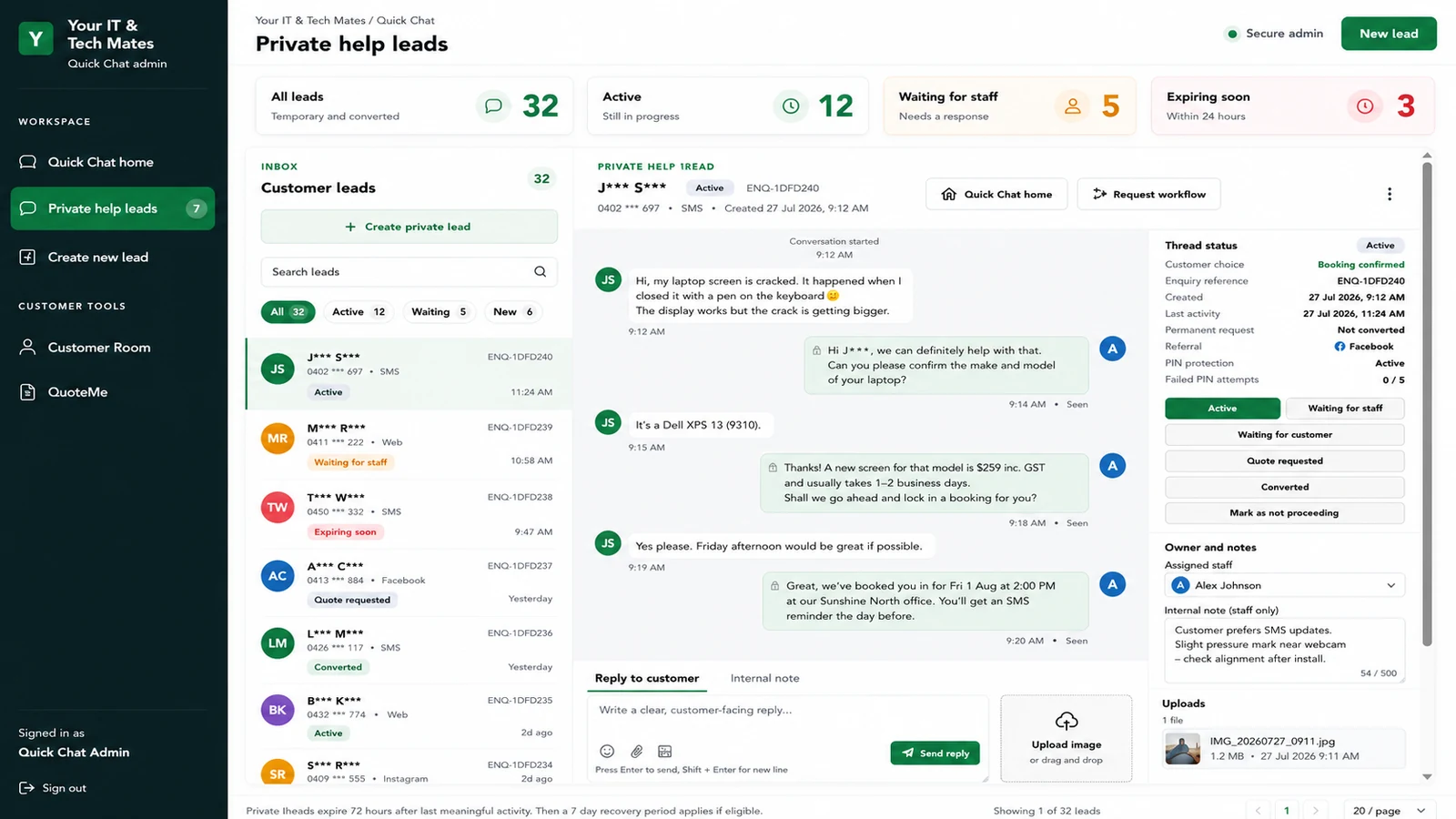
Smart Customer LeadRoom is a secure customer-enquiry workspace that lets customers continue through a private link while staff manage ownership, notes, photos and follow-up from one shared lead record.
SMS is useful for first contact, but it was not designed to manage a growing lead pipeline. The friction appears when the business needs to find photos, share responsibility, remember follow-ups or prove what was agreed.
Job descriptions, addresses, device details and customer photos sit inside long message histories.
Good leads can be missed when no clear owner or next action is recorded.
Other authorised staff may not know what has been answered or promised.
Owners often spend evenings reconstructing conversations and preparing quotes.
The customer can still start by SMS, phone, email, website or social media. LeadRoom improves what happens after that first contact.
Create one protected lead record from the original enquiry.
Give the customer a private link and separate access PIN.
Keep messages, permitted photos and optional job or device information together.
Assign staff, add private notes and see whether the customer or business is waiting.
Move a genuine lead towards assessment, quote and job steps without creating a second conversation.
Customers should not need to install an app or repeat the same information to multiple people.
Authorised staff can see the lead status and next action without searching through individual phones.
A lead system should collect only what is useful, keep internal information separate and avoid exposing customer details unnecessarily.
The customer uses a private link and a separately supplied PIN rather than receiving sensitive information in the URL.
Customer names and contact information can be reduced or masked in dashboard views where full details are not needed.
Internal notes remain distinct from customer-visible messages, supporting clearer boundaries and handovers.
Important: Smart Customer LeadRoom is not a place to request passwords, banking details, card information, PINs or verification codes. A normal chat reply is also not a substitute for structured quote acceptance or repair approval.
| Workflow need | SMS-only process | Smart Customer LeadRoom |
|---|---|---|
| Lead ownership | Often depends on who received the message. | Assign an owner and make the next action visible. |
| Photos and details | Buried across message threads and personal devices. | Connected to the correct protected lead record. |
| Follow-up | Depends on memory, flags or manual notes. | Lead status and next action can be tracked. |
| Team handover | Context may need to be retold or copied. | Authorised staff use one shared customer history. |
| Progress to work | Information is copied into separate quote or job tools. | The same conversation can progress through existing customer workflows. |
The planned AI layer is deliberately practical. It can help organise work while staff remain responsible for customer communication and commercial decisions.
Suggest a service type or urgency for staff review.
Turn a long conversation into a short operational summary.
Prepare a response that staff can check, edit and approve.
Highlight leads that may be waiting too long.
It is designed for businesses where customer work begins with a conversation and often needs photos, clarification, follow-up or a quote.
Electricians, plumbers, builders, landscapers and mobile service teams.
Technology, appliance, equipment and other assessment-based repairs.
Owners who need fewer after-hours messages and more organised follow-up.
Businesses that need shared visibility without a heavy enterprise CRM.
The best fit is a business with a proven enquiry problem—not a business looking for software before the workflow is understood.
Explore practical articles about SMS lead capture, tradie workflows, secure photo collection, AI reminders and software choices.
A step-by-step workflow for moving a lead from first contact into an organised record.
Read guideReduce after-hours admin and stop good opportunities disappearing inside SMS.
Read guideKeep job and repair photos connected to the correct enquiry instead of scattered across phones.
Read guideWe start with the workflow, not a software sales pitch.
Show where the lead starts, what staff repeat and where follow-up breaks down.
We check whether a process change, existing tool, integration or focused pilot is the right response.
Use a small workflow and fake or approved test data before wider use.
Yes. SMS, phone, email, website and social enquiries can remain entry points. LeadRoom organises the continuing conversation and next actions.
No. A customer can begin with a private link and access PIN. A verified customer record is only needed when the enquiry progresses through the appropriate customer workflow.
Yes. Customers can upload permitted photos connected to the correct lead so staff do not need to search across unrelated message threads.
No. A lead remains an enquiry until the customer and staff complete the appropriate assessment, quote and approval steps.
Not by default. Planned AI assistance focuses on tagging, summaries, reminders and reply drafts for staff review. Staff remain responsible for communication, pricing and decisions.
Pricing depends on staff users, lead volume, workflow requirements, integrations and support. Your IT & Tech Mates can review the workflow and provide tailored options.
Not necessarily. If the CRM can support the workflow with sensible configuration, that may be the better option. LeadRoom is most relevant when a verified customer-enquiry gap remains.
Tell Your IT & Tech Mates how enquiries arrive, where follow-up slows down and what information your team needs before preparing a quote.