
Quick answer
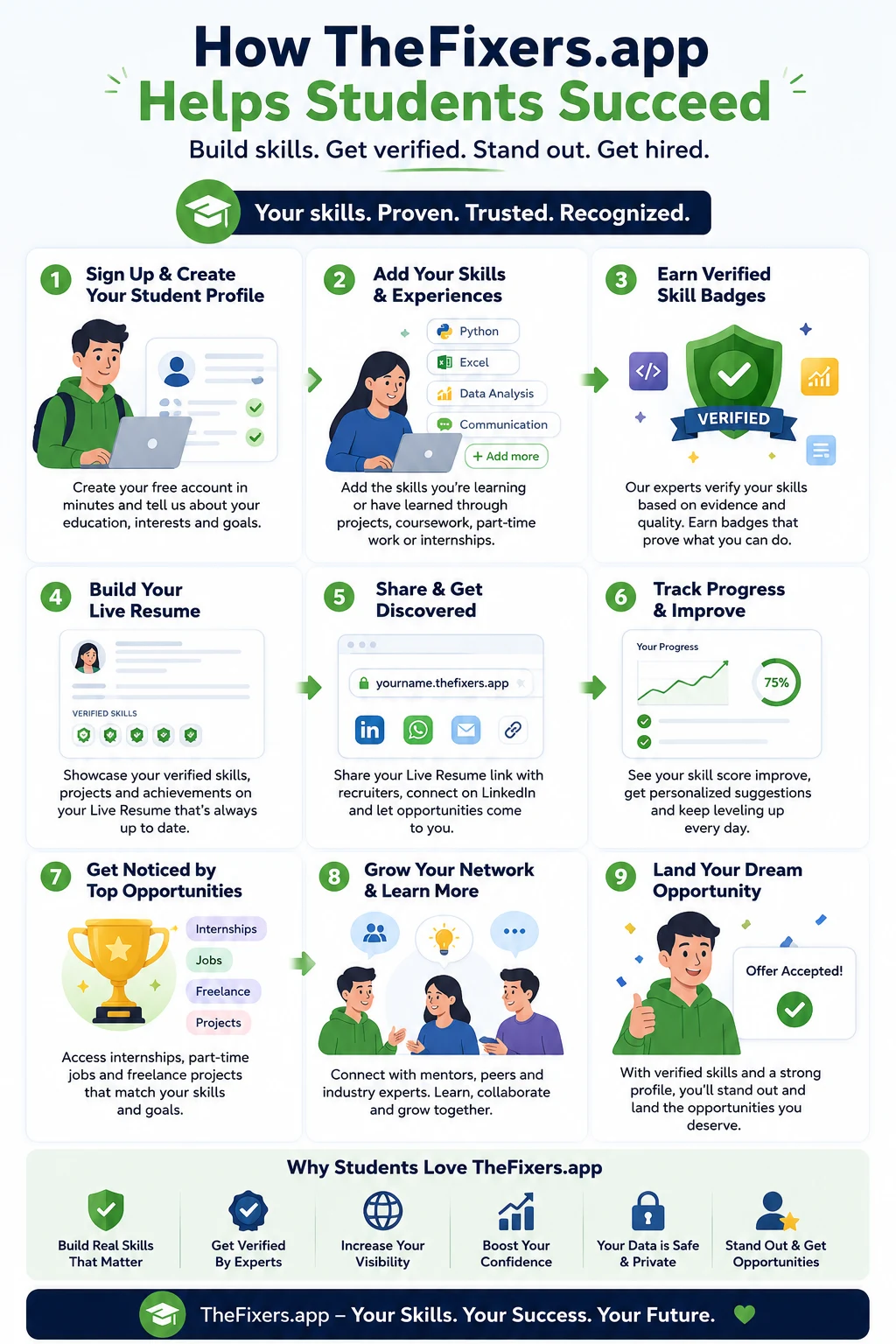
TheFixers.app helps students build real-world experience by guiding them from a student profile to beginner-friendly tasks, safe proof collection, verified skill badges and a shareable Live Resume for job, internship and local opportunity applications.
What is a student Live Resume?
A student Live Resume is a shareable proof page that can show a student’s verified skills, completed tasks, reviewed examples, feedback and progress. Unlike a normal resume, it can grow as the student completes more suitable activities and collects safer evidence.
For early-career students, this helps answer a common employer question: “Can you show me what you have actually done?”
How TheFixers.app works for students
- Join the student pathway: start from the student pathway page and add your goals, skills and readiness level.
- Find beginner-friendly opportunities: check the student notice board for suitable tasks, learning examples or referral opportunities.
- Build proof safely: record what you did, what skill you used, what was checked and what can be shared without private details.
- Build Live Resume examples: use the Live Resume guide to turn completed activity into interview-ready examples.
Who this guide is for
This guide is for students who want work experience, internship examples, part-time job proof, beginner tech support experience, local helper opportunities or a better way to explain practical skills before they have a long employment history.
Start here in TheFixers.app
If you are a student, start with the student pathway first. Then use the guides when you need help choosing what proof to build.
Create or open your student pathway, then add your skills, goals and readiness level.
2. Check beginner opportunitiesLook for student-friendly tasks, referral work or practice tasks that match your current confidence.
3. Learn Live Resume proofUse the Live Resume guide to understand what evidence is safe, useful and interview-ready.
Best for you if
- You want experience but do not yet have a long work history.
- You want practical examples for your resume, interview or internship application.
- You are good at helping people but need a safer way to record and prove it.
- You want to build confidence through small, guided steps instead of guessing what to do next.
What students can do today
- Create a student profile with your study area, interests, location and goals.
- Add three skills you already use, such as communication, phone setup, Microsoft 365, Wi-Fi basics or customer support.
- Choose one beginner-friendly practice task or support task.
- Write down what you did, what skill you used, what was checked and what result you helped create.
- Add the approved outcome to your Live Resume when it is safe to share.
The student problem: “How do I prove experience?”
A traditional resume can be hard for students because many students are still building their first examples. They may have helped family, supported classmates, completed assignments, solved device issues or explained technology to someone, but none of that becomes useful unless it is recorded clearly.
TheFixers.app is designed to help students turn those small moments into a stronger proof trail.
Normal resume vs Live Resume proof
| Normal resume claim | Live Resume proof |
|---|---|
| Good communication skills | Reviewed task note showing how the student explained a setup clearly. |
| Basic IT knowledge | Verified skill tag linked to a completed beginner support task. |
| Problem solving | Short situation-action-result example from a safe practice task. |
| Reliable and helpful | Approved feedback, attendance, follow-up notes or mentor sign-off. |
This makes the student’s story easier for employers, mentors and local opportunities to understand: the page explains the skill, the evidence and the outcome in plain language.
The journey through TheFixers.app
Add who you are, what you are studying, what you can help with and what kind of opportunity you want.
Include study skills, technical basics, communication, customer service, languages, admin, design, data or local support experience.
Start with safer tasks such as phone setup, app help, simple troubleshooting, digital confidence support or referral sharing.
Keep task summaries, approved feedback, skill evidence and notes that explain what happened without exposing private details.
Verified skill badges help show that a skill is supported by evidence, review or real activity, not only self-claimed.
Your profile grows into a proof page that can explain your tasks, skills, feedback, reliability and progress.
Use your Live Resume with employers, internship providers, mentors, local businesses or student support programs.
Review what worked, add new skills, ask for guidance and keep building better examples over time.
Example: turning one small task into proof
A student helps someone set up email on a phone. On its own, that sounds small. But if recorded properly, it can show phone setup, patience, troubleshooting, clear communication and follow-through.
That becomes stronger Live Resume wording: “Supported a user with basic phone setup and email access while practising clear communication, privacy awareness and step-by-step troubleshooting.”
What the Live Resume can show
- Verified skills and skill tags.
- Completed practice tasks or support tasks.
- Approved reviews, sign-off notes or feedback.
- Safe examples of what the student learned or completed.
- Interview-ready stories that explain the situation, action and result.
Safety matters: students should not do every job
The student pathway should be realistic and safe. Some work should stay with experienced providers, especially when it involves private data, passwords, payments, security risk, advanced repairs or business-critical systems.
Basic setup, simple app help, guided checklists, digital confidence support and clear communication tasks.
Anything unclear, urgent, private, expensive, security-related or beyond the student’s current skill level.
Proof should not expose customer names, passwords, private screenshots, addresses, payment details or sensitive files.
Keep building proof
Student pathway links
Common student questions
Do I need paid experience first?
No. You can start with safe proof-building tasks, practice tasks, volunteer-style help, communication examples and guided support activity.
Can I share everything I do?
No. Share only approved, privacy-safe proof. Do not publish private customer details, screenshots, passwords, files, addresses or anything sensitive.
What if I am not very technical yet?
Start with communication, setup help, referral sharing, admin follow-up, simple checklists or digital confidence tasks. Technical confidence can grow later.
Key takeaway
TheFixers.app helps students turn learning into visible proof. The strongest student pathway is simple: start with safe beginner tasks, record what happened, collect approved feedback, earn verified skill badges and build a Live Resume that can support job, internship and local opportunity conversations.